In this lab, I wanted to analyze a very specific use case:
How can a router connected over a PPP serial link receive its IP address dynamically from a DHCP server that is not directly attached?
What makes this lab interesting is that the DHCP client is connected through a PPP serial interface, not through a normal Ethernet LAN. That changes the behavior quite a bit.
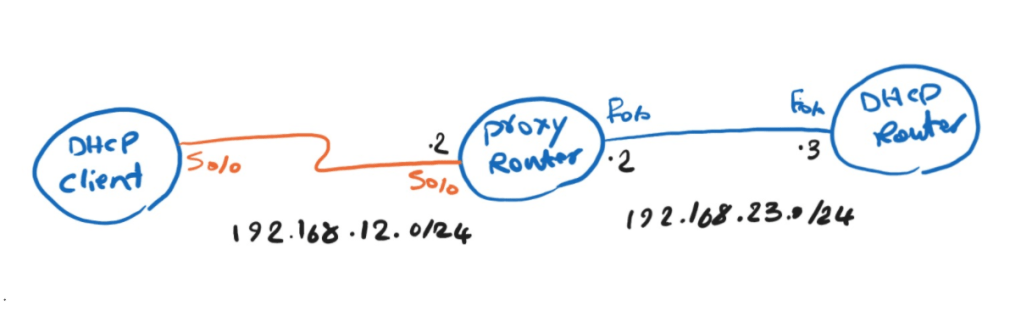
The DHCP-Client router should receive its IP address dynamically on Serial0/0.
So we need a mechanism that allows the middle router to say:
“If my PPP neighbor asks me for an IP address, I will use DHCP to obtain one for it.”
DHCP-Client router configuration:
interface Serial0/0
 ip address negotiated
 encapsulation ppp
 clock rate 2000000
PPP comes up between DHCP-Client and Proxy-Router During PPP negotiation, the client asks for an IP address Since the IP is negotiated, the client expects the remote PPP peer to provide it.
The important command is on the Proxy-Router:
Proxy-Router#sh run int s0/0
interface Serial0/0
 ip address 192.168.12.2 255.255.255.0
 encapsulation ppp
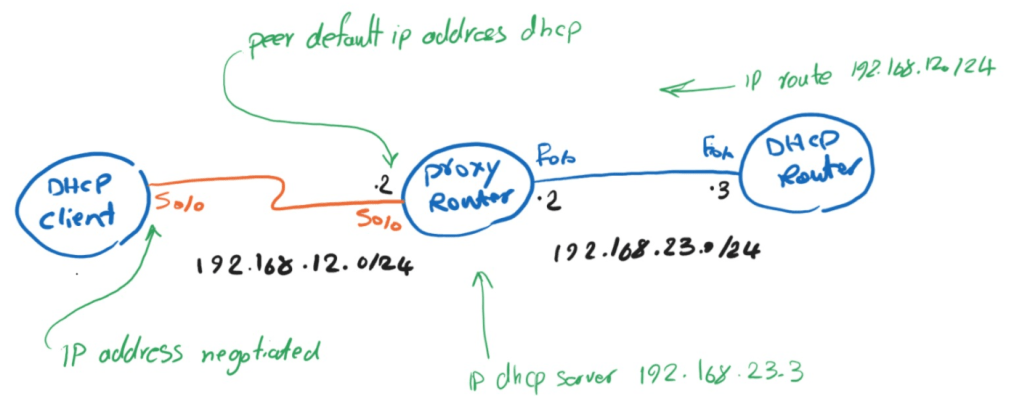
 peer default ip address dhcp
 clock rate 2000000
And this command makes it know which DHCP server to use:
ip dhcp-server 192.168.23.3
So the Proxy-Router behaves like a DHCP requester on behalf of the PPP client.
So when the client asks for an IP address, the Proxy-Router must decide:
Proxy-Router(config-if)#peer default ip address ?
  A.B.C.D    Default IP address for remote end of this interface
  dhcp       Use DHCP proxy client mechanism to allocate a peer IP address
  dhcp-pool  Use local DHCP pools to allocate a peer IP address
  pool       Use IP pool mechanism to allocate a peer IP address
Should It assign a local address manually? Should I use a local pool? or should It ask a DHCP server?
Because of “peer default ip address dhcp” it will ask a DHCP server for an address for my PPP peer.
On proxy-router we have “ip dhcp-server 192.168.23.3” command, This tells it where the DHCP server is.
On the DHCP-Router, we need a static route tothe DHCP-client configured, so that it know where is the dhcp cliet network.
DHCP-Router#sh run | i ip route
ip route 192.168.12.0 255.255.255.0 192.168.23.2
DHCP-Client#sh ip int brie
Interface                  IP-Address      OK? Method Status                Protocol
FastEthernet0/0            unassigned      YES unset  administratively down down
Serial0/0                  192.168.12.3    YES IPCP   up                    up

Leave a Reply