When we design networks, we usually assume that all traffic is treated equally. Routers forward packets as fast as possible, without considering the type of application or its requirements.
But what happens when the network becomes congested?
In real networks, not all traffic is equal. Some applications are very sensitive to delay and packet loss.
For example:
- Voice traffic (VoIP) → sensitive to delay and jitter
- Video → sensitive to packet loss
- File transfers → not sensitive, can tolerate delay
This is where QoS (Quality of Service) comes into play.
QoS allows us to control how traffic is treated when congestion occurs.
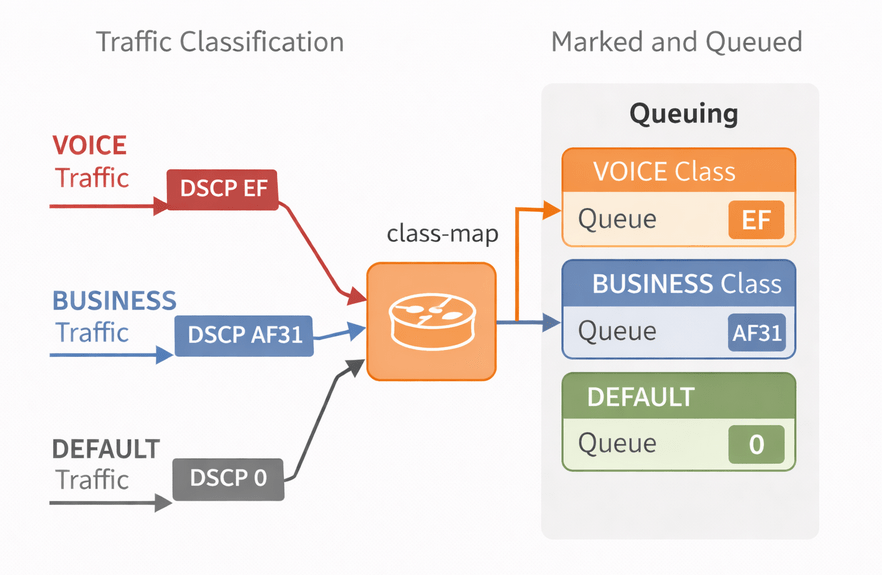
The 3 Main QoS Steps
QoS is built on three main functions:
1. Classification
Classification means identifying traffic based on specific criteria.
Examples:
- IP addresses
- Protocols (RTP, HTTP, etc.)
- Ports
- DSCP values
In other words: The router needs to understand what kind of traffic it is dealing with.
2. Marking
Marking means assigning a value to packets so the network knows how to treat them.
The most common marking field is:
- DSCP (Layer 3)
Examples:
- EF (Expedited Forwarding – DSCP 46) → Voice
- AF classes → Business applications
- BE (Best Effort – DSCP 0) → Default traffic
Marking is usually done at the edge of the network, and then trusted across the network.
3. Queuing
Queuing happens when the interface is congested.
If there is no congestion:
→ QoS does nothing.
But when congestion occurs:
→ Packets are placed into queues and scheduled for transmission.
Different queuing methods exist:
- FIFO → First In First Out
- Fair Queueing → equal distribution
- Priority Queue → strict priority for critical traffic
Simple Scenario
In this lab, we have two types of traffic:
- Voice traffic (should be prioritized)
- Data traffic (normal priority)
Both types of traffic are sent through the same interface.
We should be ensure that voice traffic is always sent first, even during congestion.
Step 1 – Classification
class-map VOICE
 match ip dscp ef
Step 2 – Policy (Queuing)
policy-map QOS-POLICY
 class VOICE
  priority 100
 class class-default
  fair-queue
Explanation:
priority→ creates a strict priority queue (LLQ)- Voice traffic always goes first
- Other traffic uses fair-queue
Step 3 – Apply Policy
interface f0/0
service-policy output QOS-POLICY

Leave a Reply