Normally, when we think about DNS, we think about dedicated DNS servers. But Cisco IOS routers can also provide useful DNS features. In this scenario, I built a small lab to test how a router can act as:
- a DNS server
- a DNS client
- a DNS server for other clients
- a fallback DNS responder when the real DNS servers are unreachable
The lab contains two DNS servers and two clients. One of the clients also works as a local DNS server for another client.
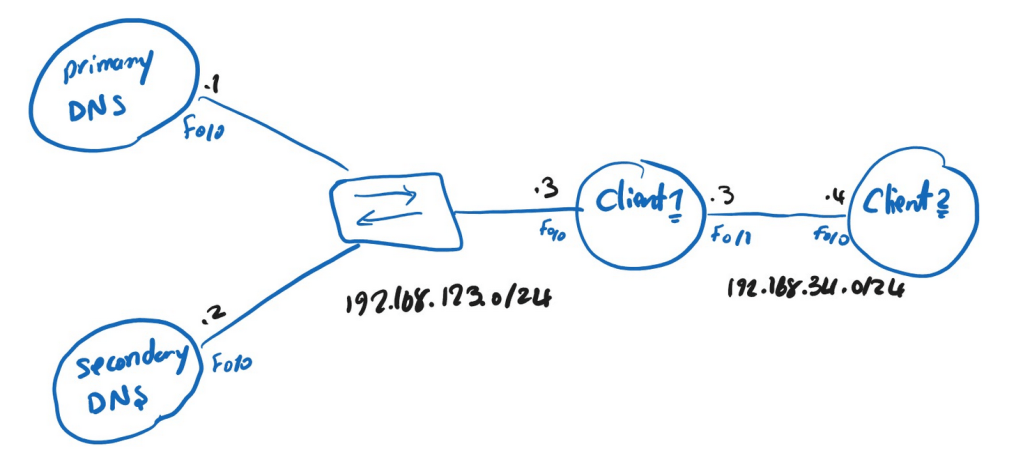
The idea is simple:
- Primary and Secondary routers act as DNS servers for the zone
- Client1 uses both DNS servers
- Client1 also works as a DNS server for Client2
- If the real DNS servers are unreachable, Client1 returns a fallback IP address using DNS spoofing
To make a Cisco router act as a DNS server, we use this command:
ip dns server
This command enables DNS service on the router so it can answer DNS queries.
After enabling DNS service, we also need to define the DNS zone. On the primary DNS server, I configured:
ip dns primary net.local soa ns1.net.local saeed.net.local
This makes the router authoritative for the zone net.local and defines the SOA record.
SOA stands for Start of Authority.
This record tells DNS clients important information about the zone, such as:
- the authoritative DNS server
- the responsible administrator
- zone authority information
So with this command, the router is not just answering queries — it is acting as the authoritative DNS server for the zone net.local.
To test name resolution, I added local DNS records on the router:
ip host net.local ns 192.168.123.1
ip host net.local ns 192.168.123.2
The secondary DNS server is configured in a similar way:
ip dns server
ip dns primary net.local soa ns2.net.local saeed.net.local
ip host net.local ns 192.168.123.1
ip host net.local ns 192.168.123.2
After configuring the primary DNS server, I verified the DNS database with show hosts. The output confirmed that the router had installed the SOA record for net.local and the host records for ns1.net.local and ns2.net.local. This proved that the router was acting as an authoritative DNS server for the zone.
Primary#sh ip dns primary
Primary for zone net.local:
  SOA information:
  Zone primary (MNAME): ns1.net.local
  Zone contact (RNAME): saeed.net.local
  Refresh (seconds):    21600
  Retry (seconds):      900
  Expire (seconds):     7776000
  Minimum (seconds):    86400

Primary#sh hosts
Default domain is not set
Name/address lookup uses static mappings

Codes: UN - unknown, EX - expired, OK - OK, ?? - revalidate
       temp - temporary, perm - permanent
       NA - Not Applicable None - Not defined

Host                      Port  Flags      Age Type   Address(es)
net.local                 NA    (perm, OK)  0  SOA      ns1.net.local saeed.net.local
                                                   0 21600 900 7776000 86400
ns1.net.local             None  (perm, OK)  0   IP    192.168.123.1
ns2.net.local             None  (perm, OK)  0   IP    192.168.123.2
On Client1, we need to define which DNS servers it should use:
ip name-server 192.168.123.1
ip name-server 192.168.123.2
By default, the router will usually try the first DNS server first. If needed, it can use the second one as well.
If we want the client to use the configured DNS servers in a round-robin manner, we can add this command:
ip domain round-robin
Another interesting part of this lab is that Client1 is not only a DNS client. It can also act as a DNS server for other devices. To do that, we enable DNS service on Client1 as well:
ip dns server
Now on Client2, we specify Client1 as the DNS server:
ip name-server 192.168.34.3
This means Client2 does not send DNS queries directly to the Primary or Secondary DNS server.
Instead, the flow is:
Client2 sends the DNS query to Client1 > Client1 processes the query > Client1 forwards or resolves it using its own DNS configuration
One of the most interesting features in this lab is the fallback mechanism. If both the primary and secondary DNS servers are unreachable, we can configure Client1 to respond with a predefined IP address:
ip dns spoofing 3.3.3.3
This command tells the router to return 3.3.3.3 as the DNS response when the normal DNS servers cannot be reached.
If the real DNS servers are not reachable, then the flow changes:
- Client2 sends a DNS query to Client1
- Client1 tries to use the configured DNS servers
- The DNS servers are unreachable
- Client1 responds with the spoofed IP address
3.3.3.3
Before shutting anything down, I tested the resolution from Client2:
Client2#ping ns1.net.local

Translating "ns1.net.local"...domain server (192.168.34.3) [OK]

Type escape sequence to abort.
Sending 5, 100-byte ICMP Echos to 192.168.123.1, timeout is 2 seconds:
!!!!!
Success rate is 100 percent (5/5), round-trip min/avg/max = 56/62/64 ms
After that, I tested the same DNS query again from Client2:
Client2#ping ns1.net.local

Translating "ns1.net.local"...domain server (192.168.34.3) [OK]

Type escape sequence to abort.
Sending 5, 100-byte ICMP Echos to 3.3.3.3, timeout is 2 seconds:
!!!!!
Success rate is 100 percent (5/5), round-trip min/avg/max = 32/33/40 ms
Now the result is different.
Instead of resolving ns1.net.local to 192.168.123.1, Client1 returns 3.3.3.3.

Leave a Reply