Application-based traffic steering using Centralized Data Policy
Before introducing dynamic path selection with Application-Aware Routing (AAR), Cisco SD-WAN already provides the ability to control traffic behavior based on application type.
This is known as Application Traffic Engineering, where traffic is classified using Deep Packet Inspection (DPI), and forwarding decisions are made based on predefined policies.
In this model, traffic can be explicitly steered toward specific transport paths (TLOCs), allowing precise control over how applications use the WAN.
here we are: matching application > setting preferred TLOC(s) [applying a centralized data policy]
IF application == X → use TLOC Y
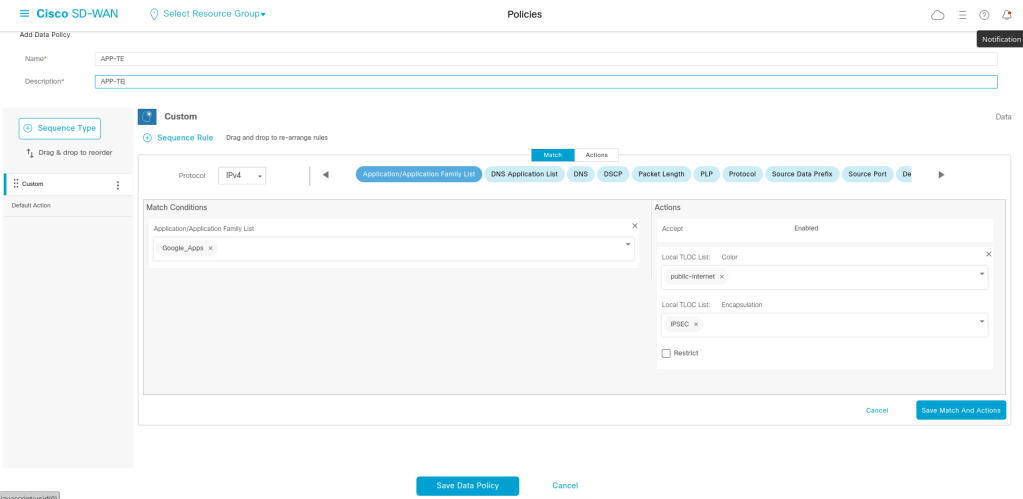
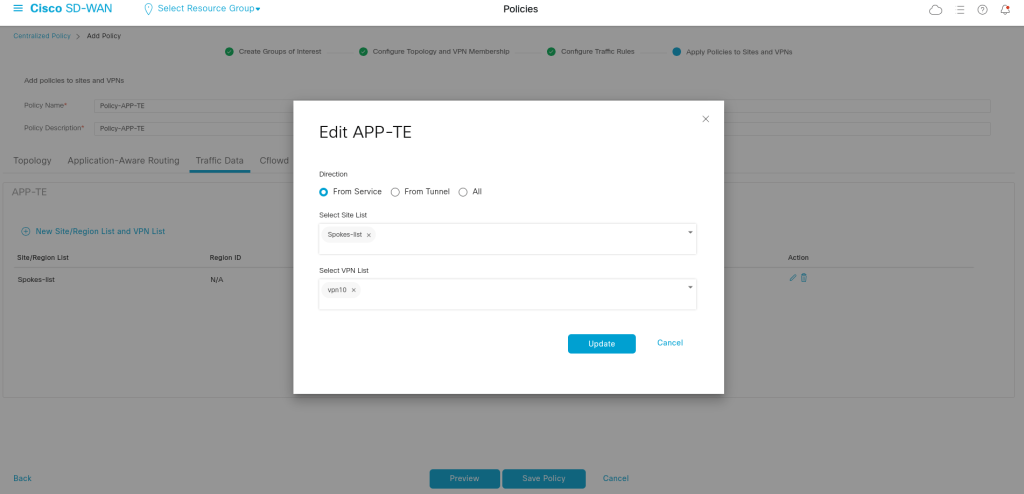
We tell that enable the policy for the traffic when it is from service side:
viptela-policy:policy
 data-policy _vpn10_APP-TE
  vpn-list vpn10
    sequence 1
     match
      app-list Google_Apps
      source-ip 0.0.0.0/0
     !
     action accept
      set
       local-tloc-list
        color public-internet
        encap ipsec
      !
     !
    !
  default-action drop
 !
 lists
  app-list Google_Apps
   app google_translate
   app google-earth
   app google_docs
   app google-services-audio
   app google_picasa
   app google-photos
   app google_appengine
   app hangouts-media
   app google_cache
   app gtalk-chat
   app google-services-media
   app gmail_mobile
   app gmail
   app google_plus
   app hangouts-audio
   app ytimg
   app youtube_hd
   app google_gen
   app google-services
   app gtalk-ft
   app google_trusted_store
   app google
   app hangouts-chat
   app google-services-video
   app google-accounts
   app google_maps
   app gmail_chat
   app google_groups
   app google-docs
   app googlebot
   app google_play_music
   app google_photos
   app chrome_update
   app google_desktop
   app google_tags
   app google_safebrowsing
   app google_earth
   app google_play
   app google_sprayscape
   app google-plus
   app picasa
   app gtalk-video
   app google_ads
   app android-updates
   app gcs
   app google_analytics
   app google_code
   app google_toolbar
   app blogger
   app hangouts-video
   app google_weblight
   app gtalk
   app gmail_basic
   app google_calendar
   app google_accounts
   app gmail_drive
   app google_classroom
   app hangouts
   app gstatic
   app google-play
   app google_spaces
   app gtalk-voip
   app google_skymap
   app hangouts-file-transfer
   app google-downloads
   app youtube
   app google_localguides
  !
  site-list Spokes-list
   site-id 1001-1003
  !
  vpn-list vpn10
   vpn 10
  !
 !
!
apply-policy
 site-list Spokes-list
  data-policy _vpn10_APP-TE from-service
 !
!
Application-Aware Routing (AAR)
In a previous traffic engineering model, applications can be statically steered over specific WAN transports using centralized data policies. While this provides deterministic path control, it does not account for real-time transport quality.
This creates a problem:
an application may continue to use its preferred path even when that path is experiencing high latency, packet loss, or jitter.
Cisco SD-WAN solves this with Application-Aware Routing (AAR).
AAR combines:
- application identification
- real-time path quality monitoring
- SLA-based decision making
to dynamically choose the most suitable transport path for each application.
How AAR Works
AAR is based on three major components:
1. Application Identification
Cisco SD-WAN identifies traffic using Deep Packet Inspection (DPI) and application signatures.
Examples include:
- Webex / Zoom
- Office365
- SAP
- HTTP / HTTPS
- custom application groups
So the router first needs to understand:
What kind of traffic is this?
2. SLA Classes
An SLA Class defines what “acceptable path quality” means.
Typical metrics are:
- latency
- loss
- jitter
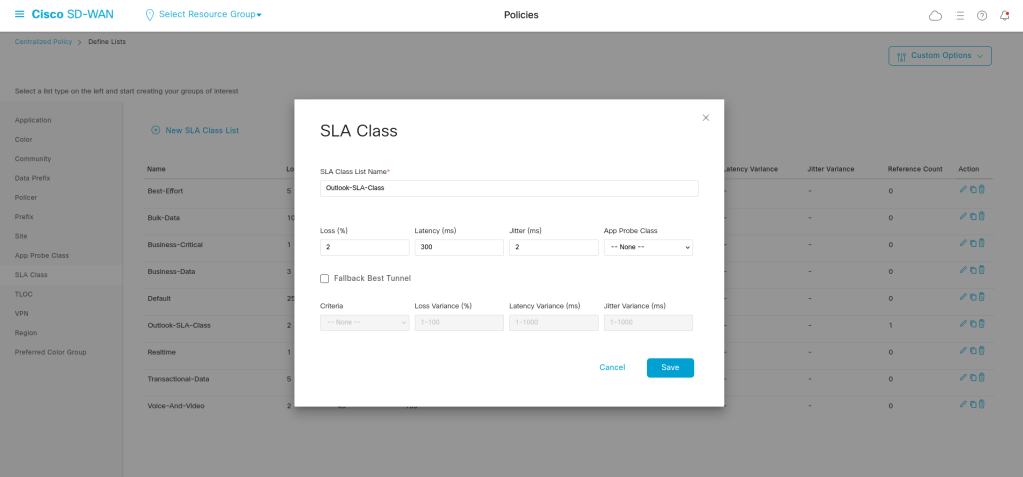
Example SLA Class:
Latency < 150 ms
Loss < 1%
Jitter < 30 ms
This gives the WAN Edge a policy-based standard for deciding whether a path is acceptable.
3. Real-Time Path Monitoring
Cisco SD-WAN continuously measures WAN path quality using BFD probes between WAN Edge routers.
This allows the fabric to constantly know:
- which transport is healthy
- which path is degraded
- whether an SLA is currently being met
That is what makes AAR dynamic.
Define the SLA in lists section:
In Centralized Policy> AAR policy:
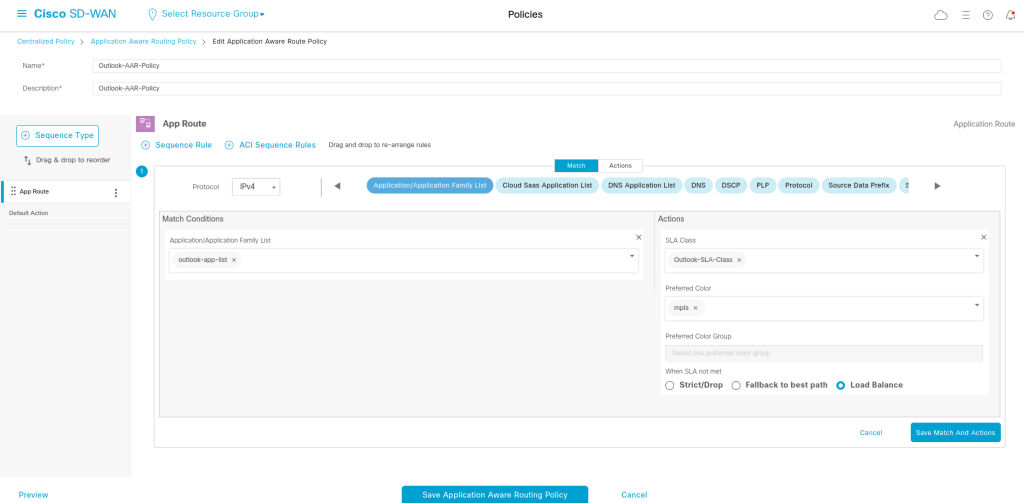
Save the policy:
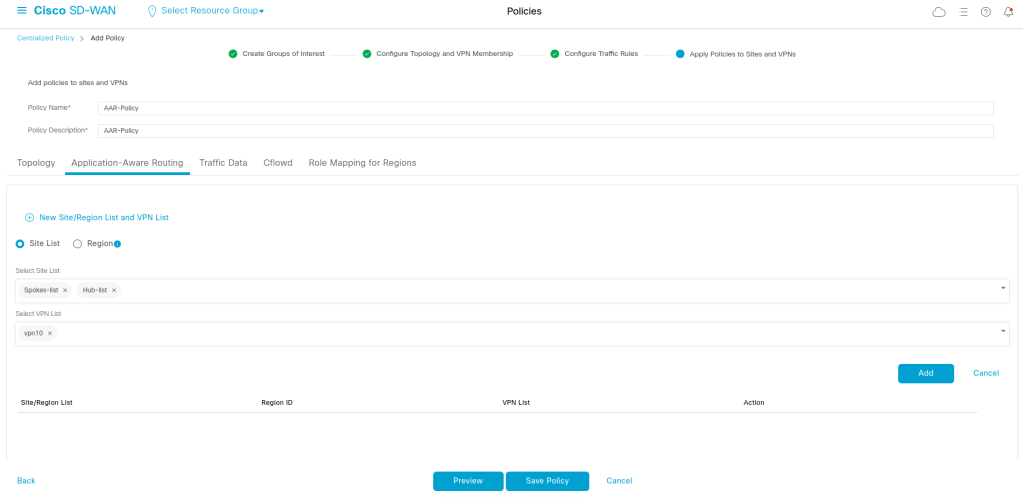
viptela-policy:policy
  sla-class Outlook-SLA-Class
   latency 300
   loss 2
   jitter 2
  !
 app-route-policy _vpn10_Outlook-AAR-Policy
  vpn-list vpn10
    sequence 1
     match
      app-list outlook-app-list
      source-ip 0.0.0.0/0
     !
     action
      sla-class Outlook-SLA-Class  preferred-color mpls
     !
    !
 !
 lists
  app-list outlook-app-list
   app live_hotmail
   app livemail_mobile
   app owa
   app outlook-web-service
  !
  site-list Hub-list
   site-id 100
  !
  site-list Spokes-list
   site-id 1001-1003
  !
  vpn-list vpn10
   vpn 10
  !
 !
!
apply-policy
 site-list Spokes-list
  app-route-policy _vpn10_Outlook-AAR-Policy
 !
 site-list Hub-list
  app-route-policy _vpn10_Outlook-AAR-Policy
 !
!
What exactly happens when the preferred color is bad?
Cisco SD-WAN first tries to use the preferred transport that meets SLA. If that is not possible, it follows the configured fallback behavior — either dropping traffic, using a backup-preferred transport, or selecting the best available path.
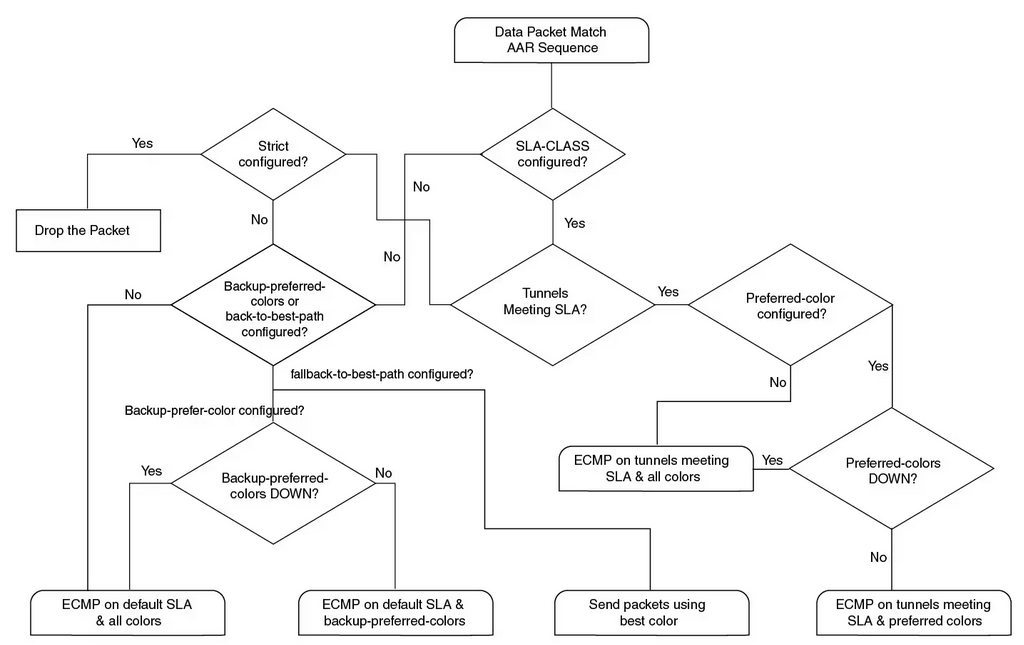
The flowchart above illustrates how Cisco SD-WAN makes a forwarding decision after traffic matches an AAR policy.
The decision is not simply based on whether a tunnel is up or down. Instead, the WAN Edge evaluates:
- whether an SLA class is configured
- whether any tunnels currently meet the SLA
- whether a preferred transport color is defined
- whether strict path enforcement is enabled
- and whether backup or best-path fallback behavior is configured
This allows AAR to make intelligent forwarding decisions that are aligned with both application requirements and transport health.

Leave a Reply