Quality of Service (QoS) is a fundamental requirement in enterprise networks, especially when different types of traffic—such as voice, video, and bulk data—share the same WAN links.
Cisco SD-WAN provides a structured QoS model that allows traffic to be:
- classified
- marked
- queued
- scheduled
- and controlled under congestion
In this post, I’ll explain how QoS works in Cisco SD-WAN, how it differs from traditional Cisco QoS (MQC), and how traffic is handled from classification to hardware queue scheduling.
Traditional Cisco QoS (MQC)
- Class-Map → classify traffic
- Policy-Map → define actions
- Service-Policy → apply to interface
Cisco SD-WAN QoS Model
Instead of MQC, SD-WAN uses:
- Forwarding Classes
- Hardware Queues
- Schedulers
- QoS Map
- Applied directly to WAN interfaces
SD-WAN QoS Flow
Traffic → Forwarding Class → Hardware Queue → Scheduler → QoS Map → Interface
Step-by-Step QoS in Cisco SD-WAN
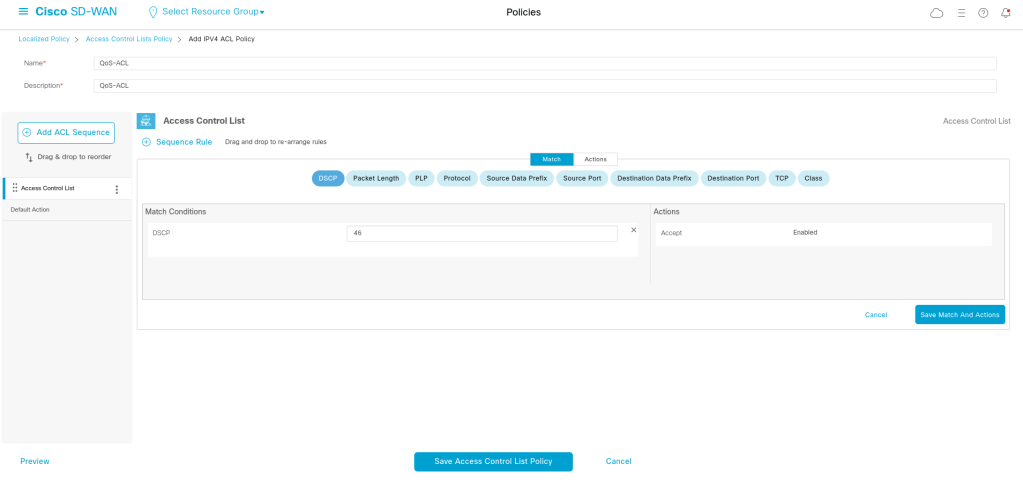
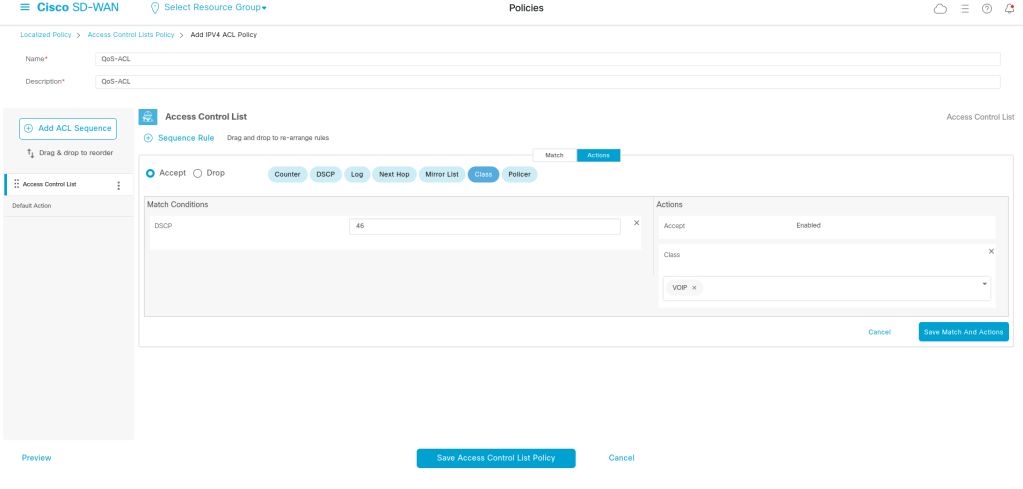
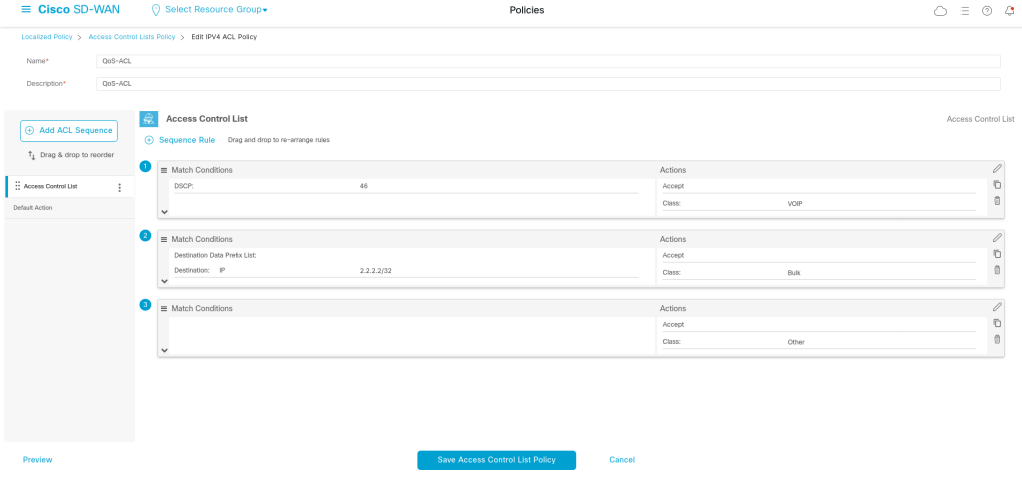
Step 1: Assign Traffic to Forwarding Classes
Traffic is first classified into Forwarding Classes.
Examples:
- Voice
- Video
- Critical Data
- Bulk
- Default
We can map based on:
- DSCP
- application
- ACL
- or policy
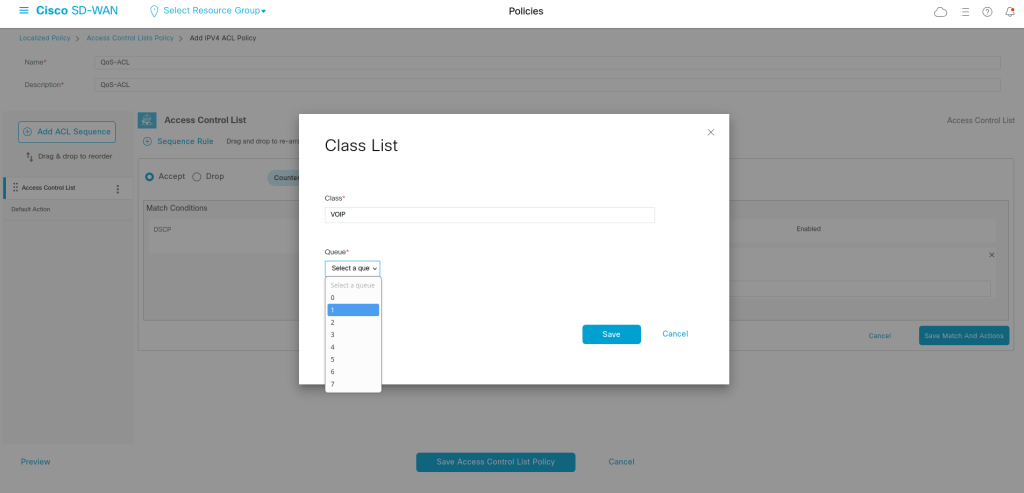
Step 2 — Map Forwarding Classes to Hardware Queues
Cisco SD-WAN uses 8 hardware queues (0–7).
Example:
| Forwarding Class | Queue |
|---|---|
| Voice | 0 |
| Video | 1 |
| Critical | 2 |
| Bulk | 6 |
| Default | 7 |
Step 3 — Configure Queue Behavior
Each queue can be configured with:
- bandwidth-percent
- buffer-percent
- scheduling method
- drop behavior
Scheduling Types
- LLQ (Low Latency Queue) → strict priority
- WRR (Weighted Round Robin) → fair sharing
Example:
- Voice → LLQ (priority queue)
- Other traffic → WRR
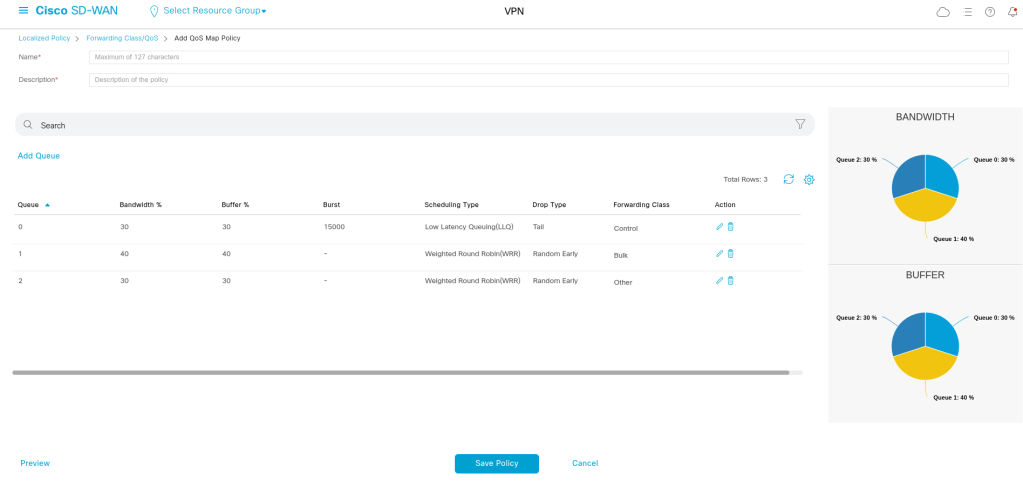
Step 4 — Create QoS Map
A QoS Map combines:
- forwarding classes
- queue assignments
- scheduling behavior
This is similar to a policy-map in MQC.
policy
  qos-scheduler QoS-map1_0
   class Queue0
   bandwidth-percent 30
   buffer-percent 30
   scheduling llq
   drops tail-drop
   burst 15000
  !
  qos-scheduler QoS-map1_1
   class Queue1
   bandwidth-percent 40
   buffer-percent 40
   scheduling wrr
   drops red-drop
  !
  qos-scheduler QoS-map1_2
   class Queue2
   bandwidth-percent 30
   buffer-percent 30
   scheduling wrr
   drops red-drop
  !
  qos-map QoS-map1
   qos-scheduler QoS-map1_0
   qos-scheduler QoS-map1_1
   qos-scheduler QoS-map1_2
  !
  class-map
   class Bulk queue 1
   class Other queue 2
   class Queue0 queue 0
   class Queue1 queue 1
   class Queue2 queue 2
  !
 cloud-qos
 cloud-qos-service-side
!
We should add the Policy to the edge device Template, after that we can use it on the interface:
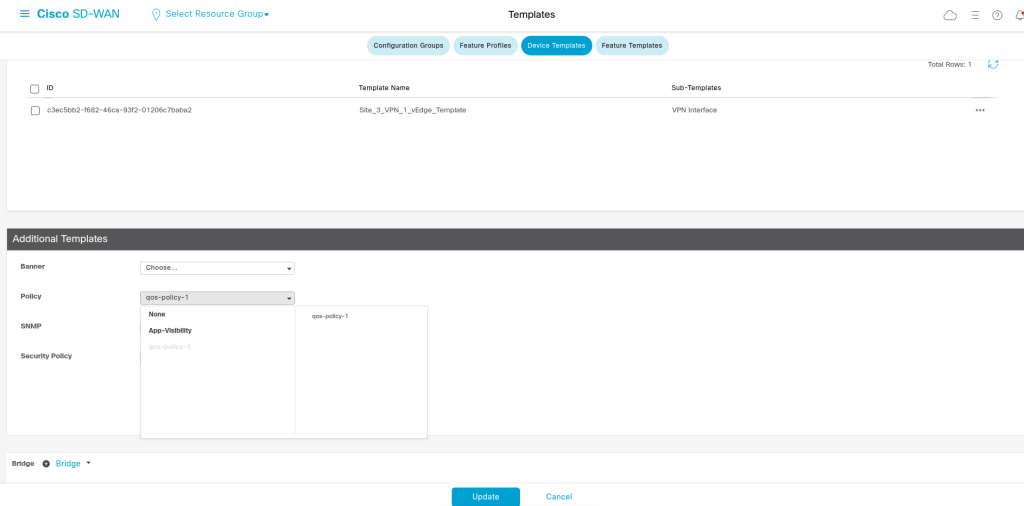
  policy
		   cloud-qos
		   cloud-qos-service-side
		   class-map
		    class Bulk queue 1
		    class Other queue 2
	       class Queue0 queue 0
		    class Queue1 queue 1
		    class Queue2 queue 2
		   !
		   qos-scheduler QoS-map1_0
	        class             Queue0
		    bandwidth-percent 30
		    buffer-percent    30
		    scheduling        llq
		    drops             tail-drop
		    burst             15000
		   !
		   qos-scheduler QoS-map1_1
		    class             Queue1
		    bandwidth-percent 40
		    buffer-percent    40
		    scheduling        wrr
		    drops             red-drop
		   !
		   qos-scheduler QoS-map1_2
		    class             Queue2
		    bandwidth-percent 30
		    buffer-percent    30
		    scheduling        wrr
		    drops             red-drop
		   !
		   qos-map QoS-map1
		    qos-scheduler QoS-map1_0
		    qos-scheduler QoS-map1_1
		    qos-scheduler QoS-map1_2
		   !
Step 5 — Apply QoS Map to Interface
QoS Map → WAN Interface
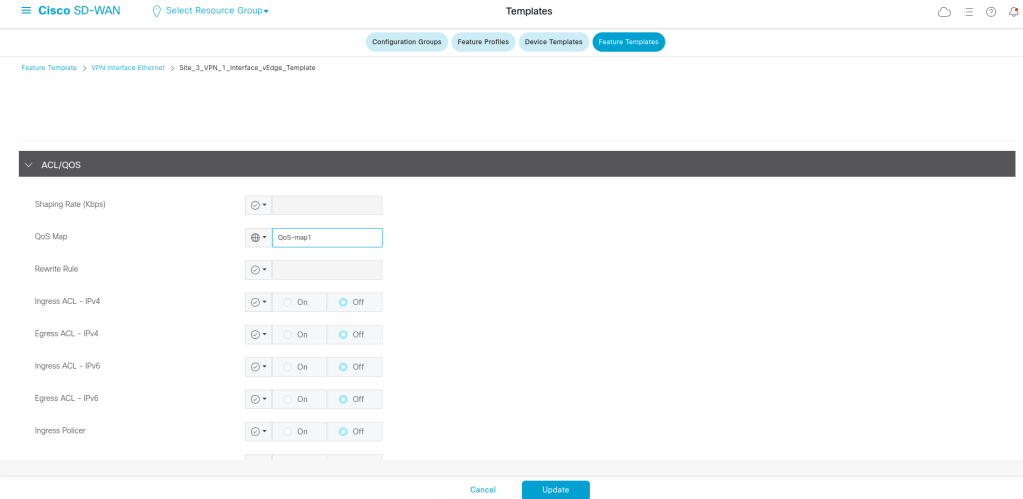
vpn 1
  interface ge0/1
    ip address 10.10.24.1/24
    no shutdown
   qos-map  QoS-map1
Example Traffic Policy
| Traffic Type | Forwarding Class | Queue | Behavior |
|---|---|---|---|
| Voice | Voice | 0 | LLQ |
| Video | Video | 1 | High priority |
| Business Apps | Critical | 2 | Guaranteed BW |
| Backup | Bulk | 6 | Low priority |
| Default | Default | 7 | Best effort |
QoS only becomes important when the link is congested.

Leave a Reply