In modern networks, we usually separate Layer 2 switching and Layer 3 routing clearly. However, in some legacy or special scenarios, a router may need to do both bridging and routing at the same time.
This is where Integrated Routing and Bridging (IRB) comes in.
Integrated Routing and Bridging (IRB) allows a Cisco router to bridge Layer 2 traffic between interfaces, while also routing Layer 3 traffic for the same bridged domain.
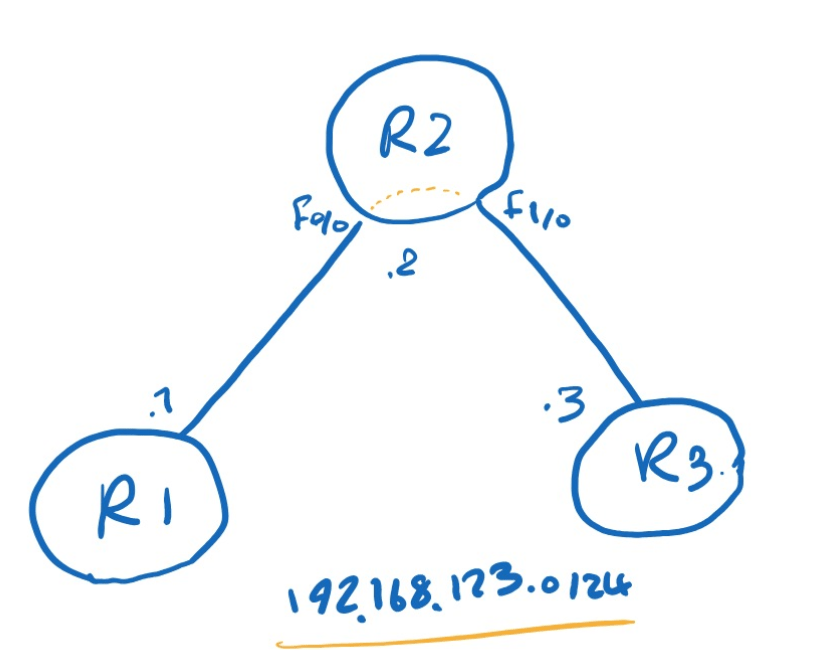
on R2:
R2(config)#bridge irb
R2(config)#bridge 1 protocol ieee
R2(config)#bridge 1 route ip

R2(config)#int bvi 1
R2(config-if)#ip add 192.168.123.2 255.255.255.0

R2(config-if)#int f0/1
R2(config-if)#bridge-group 1

R2(config-if)#int f0/0
R2(config-if)#bridge-group 1
R2#sh bridge 1

Total of 300 station blocks, 298 free
Codes: P - permanent, S - self

Bridge Group 1:

    Address       Action   Interface       Age   RX count   TX count
c403.96e0.0000   forward   FastEthernet1/0   1         15         14
c401.3d58.0000   forward   FastEthernet0/0   1         16         13
On R2:
FastEthernet0/0andFastEthernet1/0are placed in bridge-group 1- This means they act like Layer 2 bridge ports
BVI1becomes the Layer 3 interface for that bridged segment
R1#ping 192.168.123.2

Type escape sequence to abort.
Sending 5, 100-byte ICMP Echos to 192.168.123.2, timeout is 2 seconds:
!!!!!
Success rate is 100 percent (5/5), round-trip min/avg/max = 72/76/84 ms
R1#ping 192.168.123.3

Type escape sequence to abort.
Sending 5, 100-byte ICMP Echos to 192.168.123.3, timeout is 2 seconds:
!!!!!
Success rate is 100 percent (5/5), round-trip min/avg/max = 88/109/124 ms

Leave a Reply