In this lab, I am using the Cisco SD-WAN Sandbox environment to demonstrate how TLOC Preference can be used for traffic engineering.
In many enterprise WAN environments, a site has multiple WAN transports, such as:
- MPLS
- Internet
- LTE
Although Cisco SD-WAN can dynamically build tunnels across all available transports, we may want to prefer one path over another for routing decisions.
In this scenario, I want to influence the path selection so that traffic prefers one transport first, while another transport remains available as a backup path.
This can be achieved using TLOC Preference.
Before talking about TLOC Preference, it is important to understand what a TLOC is.
A TLOC (Transport Locator) identifies the WAN transport side of a Cisco SD-WAN edge device.
A TLOC is defined by:
- System IP
- Color
- Encapsulation
For example:
10.10.20.182, mpls, ipsec
10.10.20.182, biz-internet, ipsec
This means the same router can have multiple transport paths, each represented by a different TLOC.
A route associated with a higher-preference TLOC is more likely to be selected as the preferred forwarding path.
TLOC Preference influences path selection, but it does not completely remove the other path. So the secondary path may still exist and be usable for backup or failover. This is why TLOC Preference is useful for traffic engineering, not just path blocking.
Traffic simulation from Site 1 to DC:
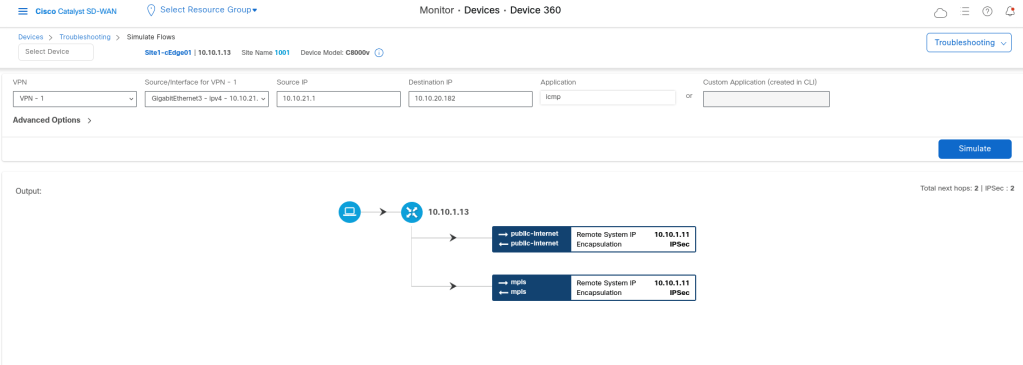
In order to change the Path manually we can do it on the interface feature template with changing the Tloc preference. But we can do it in topology policy as well.
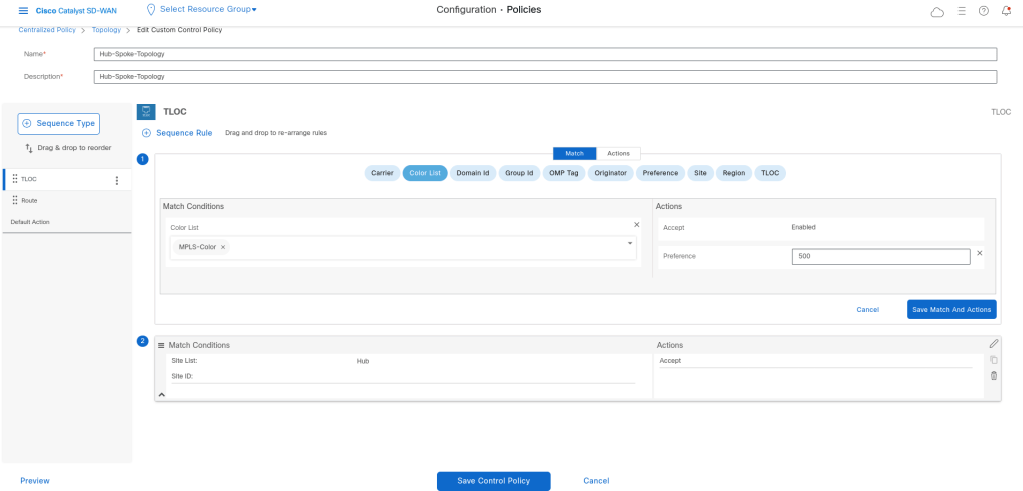
I just Matched with the color list MPLS and then set the Action to accept with setting preference for the Tloc to 500. The default value is 0.
viptela-policy:policy
 control-policy Hub-Spoke-Topology
    sequence 1
     match tloc
      color-list MPLS-Color
     !
     action accept
      set
       preference 500
      !
     !
    !
    sequence 11
     match tloc
      site-list Hub
     !
     action accept
     !
    !
    sequence 21
     match route
      site-list Hub
      prefix-list _AnyIpv4PrefixList
     !
     action accept
     !
    !
    sequence 31
     match route
      site-list Spokes
      prefix-list _AnyIpv4PrefixList
     !
     action accept
      set
       tloc-list DC-Inet_TLOC
      !
     !
    !
    sequence 41
     match route
      site-list Spokes
      prefix-list _AnyIpv4PrefixList
     !
     action accept
      set
       tloc-list DC-MPLS-Tloc
      !
     !
    !
  default-action reject
 !
 lists
  color-list MPLS-Color
   color mpls
  !
  site-list Hub
   site-id 100
  !
  site-list Spokes
   site-id 1001-1003
  !
  tloc-list DC-Inet_TLOC
   tloc 10.10.23.38 color public-internet encap ipsec
  !
  tloc-list DC-MPLS-Tloc
   tloc 10.10.23.6 color mpls encap ipsec
  !
  prefix-list _AnyIpv4PrefixList
   ip-prefix 0.0.0.0/0 le 32
  !
 !
!
apply-policy
 site-list Spokes
  control-policy Hub-Spoke-Topology out
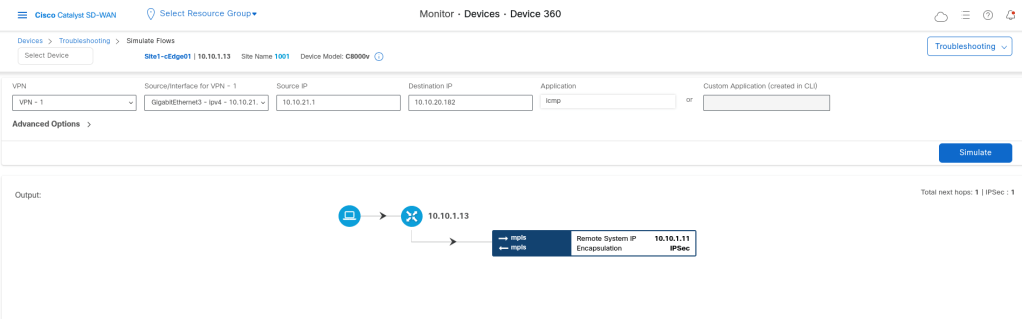
Now if we check with simulate flow:
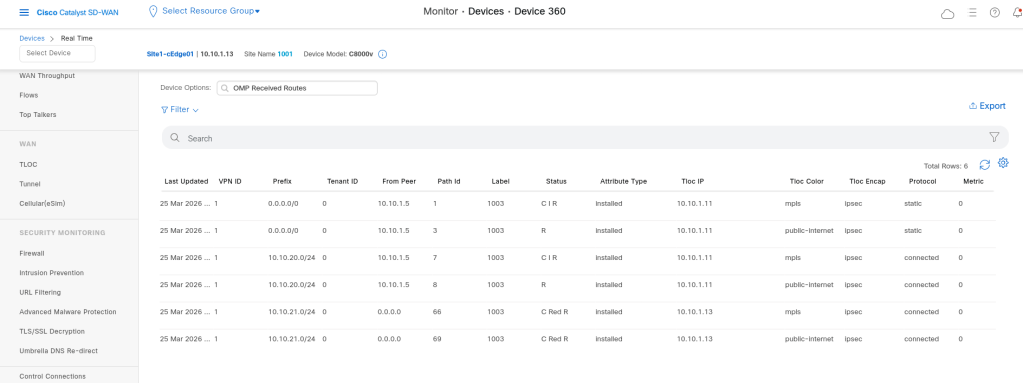
In show sdwan omp routes, the flags C, I, and R help us understand the state of an OMP-learned route.
C means the route was chosen as the best path by OMP, I means it was installed into the routing table, and R means it was successfully resolved to a valid transport path (TLOC).
A route marked as C,I,R is usually the active and usable route for forwarding traffic.
And what if one of them is missing?
If C is missing
The route was learned, but not selected as best
If I is missing
The route was chosen by OMP, but not installed into the routing table
If R is missing
The route may not have a valid TLOC resolution, so forwarding may fail.

Leave a comment