When multiple traffic flows pass through a router, the default behavior is usually very simple. Packets are processed in the order they arrive, without any awareness of the type of traffic or its importance.
This behavior works fine until the network becomes busy.
If one application starts sending a large amount of traffic, it can fill up the queue and delay everything else. In this situation, smaller and more sensitive traffic like voice or SSH can suffer, even though it requires much less bandwidth.
This is where WFQ (Weighted Fair Queuing) comes into play.
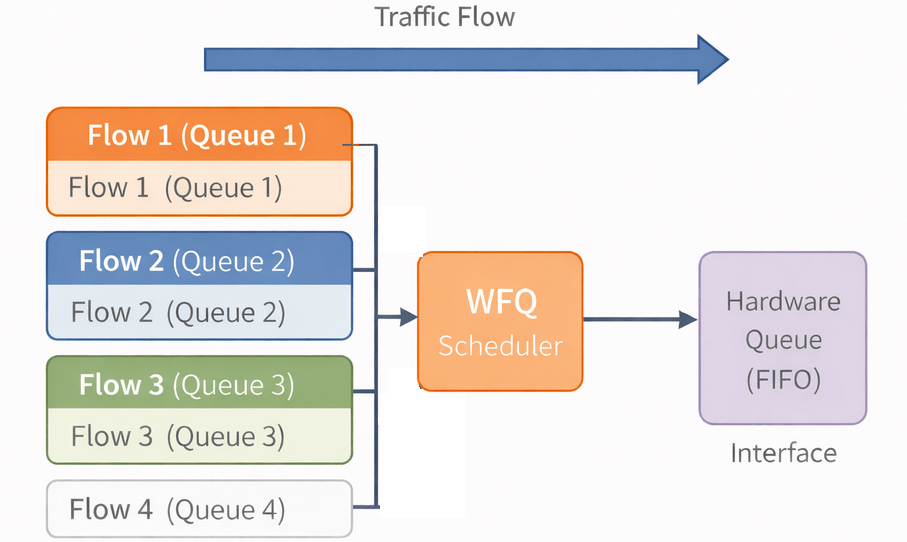
WFQ is designed to create fairness between different traffic flows. Instead of treating all packets as a single stream, the router separates them into individual flows and schedules them in a more intelligent way.
In WFQ, a flow is defined by a combination of parameters such as source and destination IP address, protocol, and port numbers. Each flow gets its own queue, and the router decides how to serve these queues based on a weighting mechanism.
The important idea here is that not all flows behave the same. Some flows send large packets continuously, while others send small packets occasionally. WFQ naturally favors the smaller and more interactive flows, which results in better responsiveness for applications like voice or remote access.
To understand this better, imagine a simple scenario.
A user is downloading a large file using FTP, while at the same time another user is making a voice call. Both types of traffic pass through the same interface.
Without WFQ, the FTP traffic can easily dominate the queue because it continuously sends large packets. The voice packets have to wait, which introduces delay and affects call quality.
With WFQ, the router separates these two flows and services them fairly. The voice packets are transmitted more frequently, even though they are smaller, while the FTP traffic is still allowed to use the remaining bandwidth. From the user’s perspective, the file download continues, but the voice call remains clear and stable.
One of the advantages of WFQ is that it does not require manual configuration in many cases. It works automatically by analyzing the flows and applying fairness. This makes it useful as a default mechanism, especially on lower-speed links.
However, WFQ also has limitations. It does not provide strict prioritization, which means it cannot guarantee bandwidth for critical applications like voice. For this reason, modern network designs usually rely on more advanced mechanisms such as CBWFQ and LLQ.
In real networks today, WFQ is not commonly used as a design tool, but it remains important to understand. Many advanced QoS features are built on the same principles of fairness and flow-based scheduling.
Understanding WFQ helps build a strong foundation for designing more advanced QoS policies later.
Class-Based Weighted Fair Queuing
After understanding how WFQ works, a limitation becomes clear. WFQ automatically creates queues based on flows, but we have no control over how bandwidth is distributed between different types of traffic.
In real networks, this is not enough.
We don’t just want fairness. We want control.
This is where CBWFQ (Class-Based Weighted Fair Queuing) comes into play.
CBWFQ allows us to manually define traffic classes and assign bandwidth to each class. Instead of relying on automatic flow detection, we explicitly decide how different types of traffic should be treated.
In CBWFQ, traffic is first classified using class-maps. These classes can represent applications such as voice, video, or business-critical data.
Each class is then assigned a queue. The router services these queues based on configured bandwidth values, which ensures that important traffic always receives the resources it needs.
Unlike WFQ, where behavior is automatic, CBWFQ gives full control over bandwidth allocation.
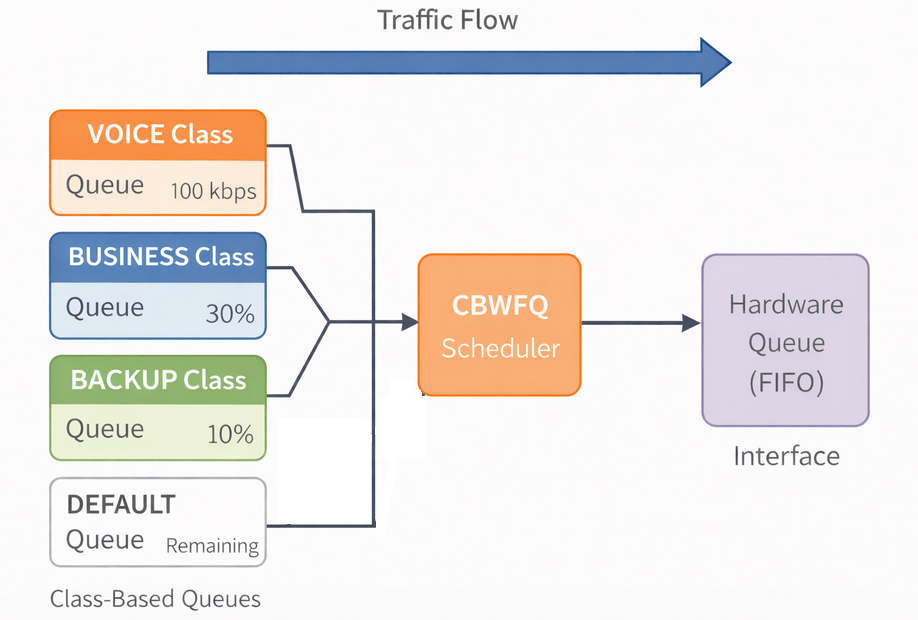
To understand this better, imagine a link shared by three types of traffic:
- Voice
- Business applications
- Backup traffic
With WFQ, all flows are treated fairly, but voice traffic may still suffer during congestion.
With CBWFQ, we can define exactly how much bandwidth each type of traffic should receive. For example, we can guarantee a portion of the link for business applications and limit how much backup traffic can consume.
Simple Scenario
In this lab, we classify traffic into two categories:
- Important traffic
- Default traffic
The goal is to guarantee bandwidth for important traffic, even when the link is congested.
Step 1 – Classification
class-map IMPORTANT
 match ip dscp af31
Step 2 – Policy
policy-map CBWFQ-POLICY
 class IMPORTANT
  bandwidth 100
 class class-default
  fair-queue
Here, the router ensures that the IMPORTANT class always gets a defined share of bandwidth during congestion.
Step 3 – Apply Policy
interface f0/0
service-policy output CBWFQ-POLICY
Low Latency Queuing (LLQ)
Even with CBWFQ, one important problem still exists.
All traffic is treated fairly based on bandwidth allocation, but there is no strict priority. This means that delay-sensitive traffic like voice can still experience latency during congestion.
In real-time applications, even small delays can have a noticeable impact.
This is where LLQ (Low Latency Queuing) comes into play.
LLQ extends CBWFQ by introducing a priority queue.
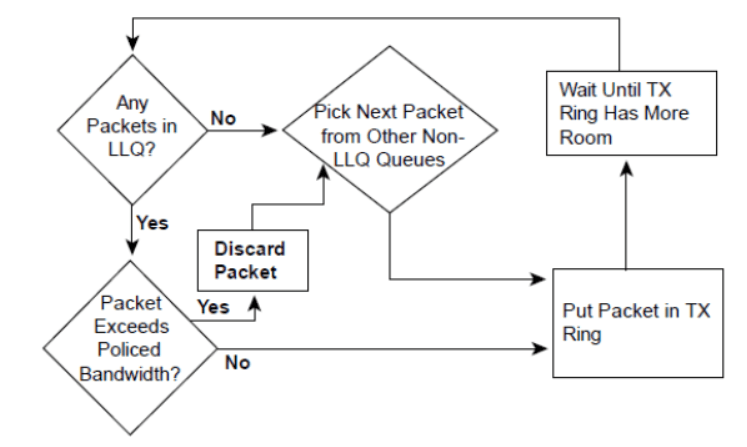
In LLQ, one class can be configured as a strict priority queue. Traffic in this queue is always sent first, before any other queues are serviced.
This makes LLQ ideal for voice traffic, where delay and jitter must be minimized.
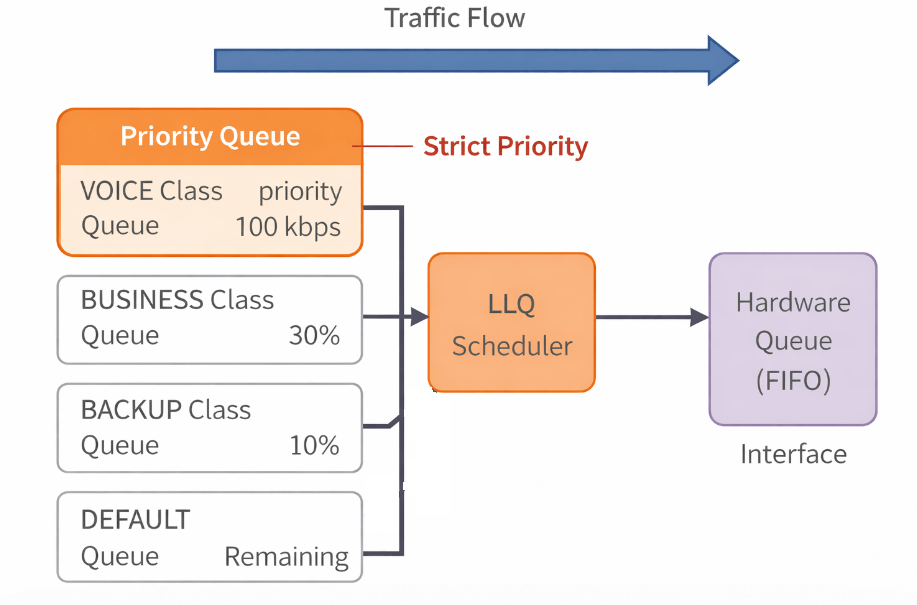
With CBWFQ, voice traffic gets guaranteed bandwidth, but it still competes with other traffic in terms of scheduling.
With LLQ, voice traffic is placed into a priority queue and is transmitted immediately, regardless of other queues.
Simple Scenario
We classify voice traffic and ensure it is always transmitted first.
Step 1 – Classification
class-map VOICE
 match ip dscp ef
Step 2 – Policy
policy-map LLQ-POLICY
 class VOICE
  priority 100
 class class-default
  fair-queue
The priority command creates a strict priority queue.
Step 3 – Apply Policy
interface f0/0
service-policy output LLQ-POLICY

Leave a Reply