Cisco SD-WAN is often discussed from the perspective of routing, transport selection, and centralized management.
However, one of its major strengths is the ability to integrate networking and security into a unified WAN architecture.
In many enterprise environments, WAN edge routers are not only responsible for transporting traffic, but also for enforcing security policies at branch locations.
In this post, I will provide an overview of the main security capabilities commonly associated with Cisco SD-WAN, including:
- Firewall
- IPS / IDS
- URL Filtering
- AMP
- DNS Security
Why Security Matters in SD-WAN
Traditional WANs often relied on a centralized Data Center security model:
- Branch → MPLS → Data Center → Internet
That worked when most applications were hosted internally.
But today, with:
- SaaS
- cloud applications
- direct internet access (DIA)
- remote branches
security can no longer depend only on a central firewall in the Data Center.
This is where SD-WAN security becomes important.
Cisco SD-WAN allows organizations to enforce security either:
- locally at the branch
- centrally through the Data Center
- or by using cloud-based security integrations
Security Approaches in Cisco SD-WAN
In general, Cisco SD-WAN security can be divided into two models:
A) Built-in Security on the WAN Edge
Security features directly on the SD-WAN router
B) Integrated Security Services
Traffic is redirected to external or cloud-based security platforms
That distinction is very important and makes your article look much more mature.
Zone-Based Firewall
One of the basic built-in security functions in Cisco SD-WAN is the Zone-Based Firewall (ZBFW).
This allows the WAN Edge router to inspect and control traffic flows between different zones, such as:
- LAN
- WAN
- VPN segments
- guest/user networks
What it can do:
- Permit or deny traffic
- Match protocols and ports
- Control traffic between trust boundaries
- Apply security policies directly at the branch
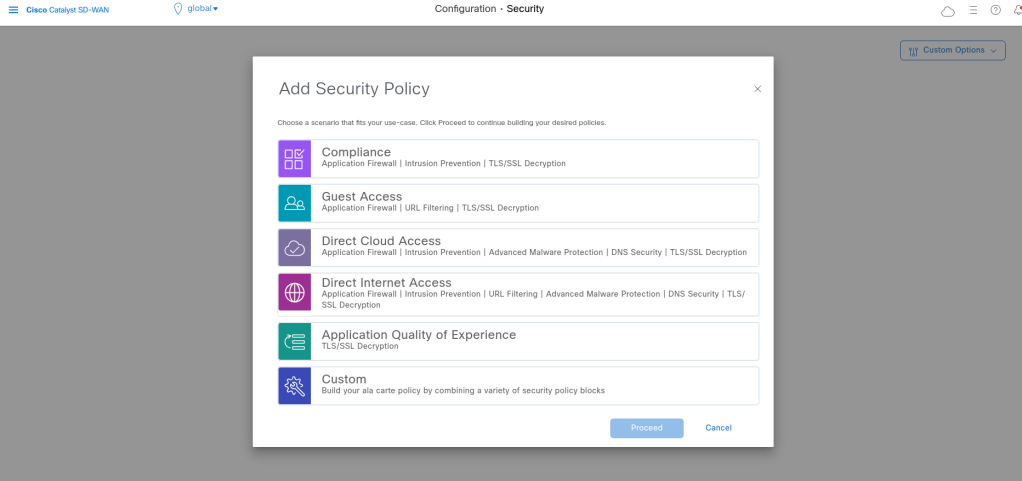
We can use wizards about different Security features but I want to use Custom to see all features and settings:
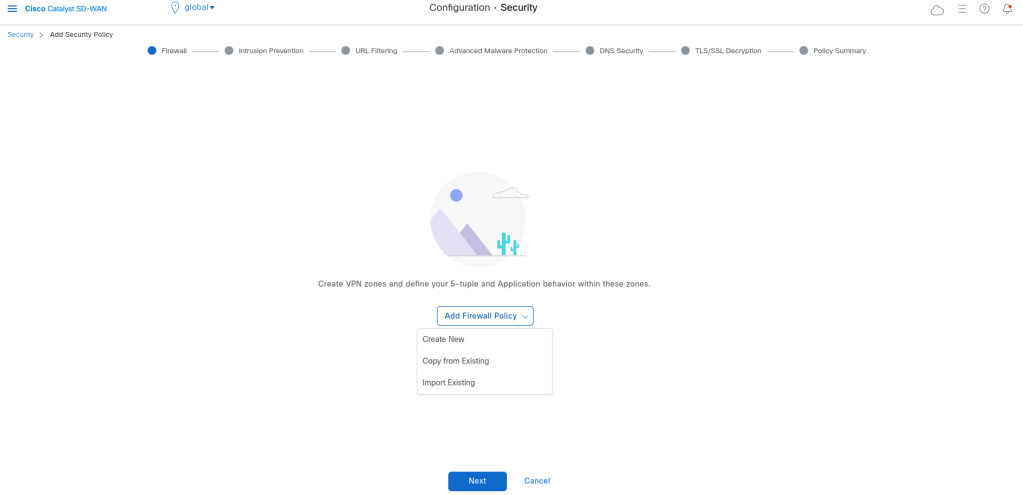
For adding Firewall Policies, we need to define zones and the write rules which will be apply between zones:
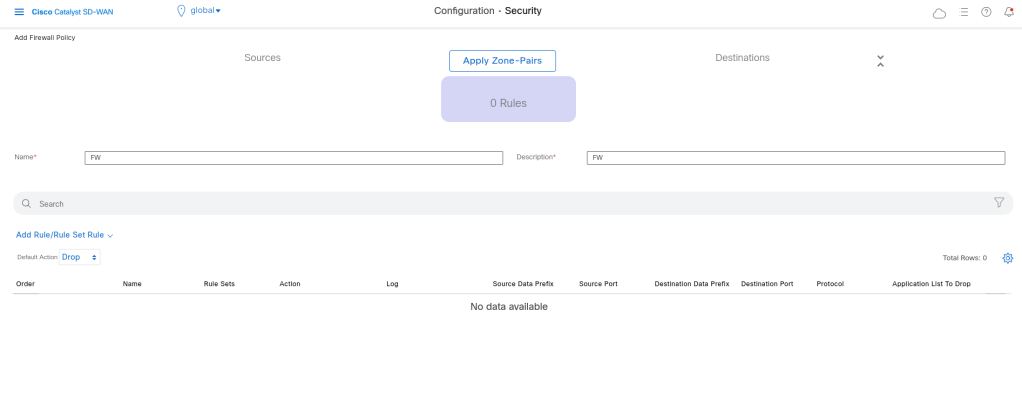
Define Zones:
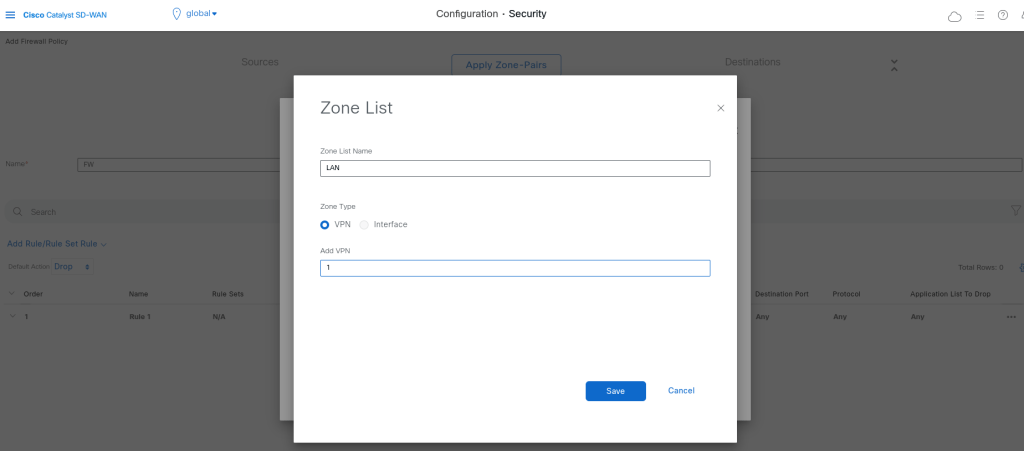
Zones can be vpns or interfaces.
Adding rules:
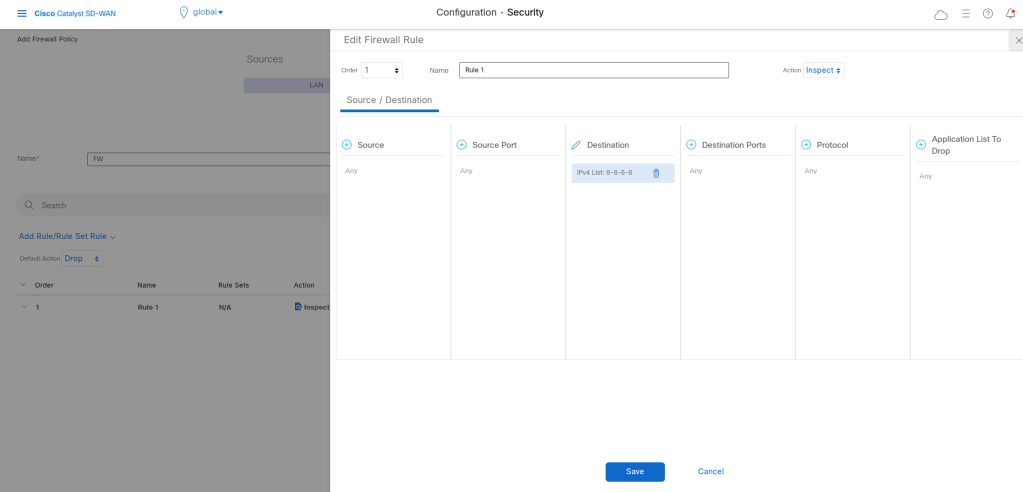
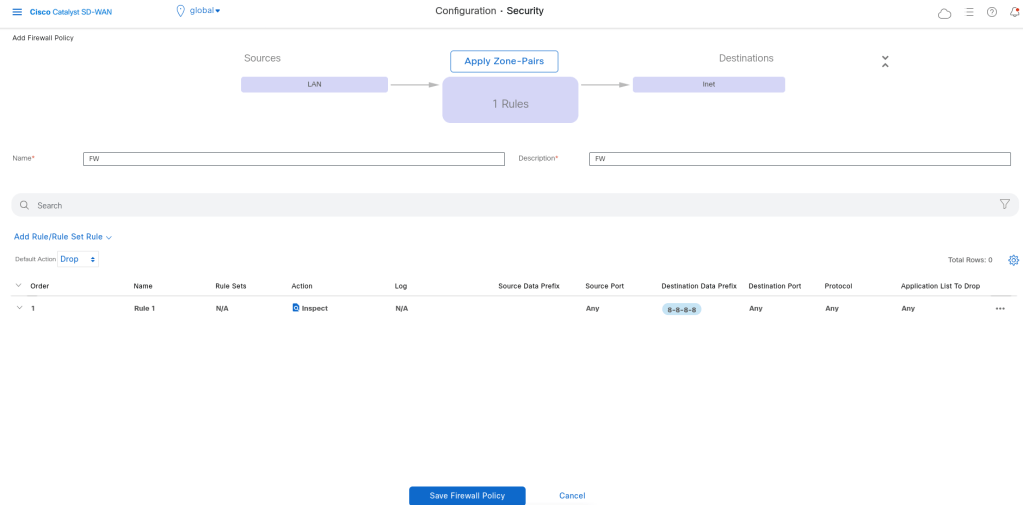
IDS / IPS
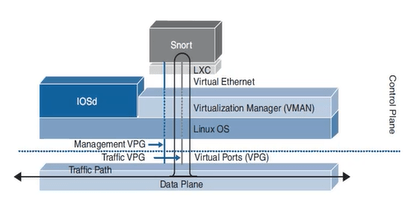
Cisco SD-WAN can also provide Intrusion Detection and Prevention capabilities depending on the platform and licensing/integration model.
Even if traffic is routed correctly, it may still contain:
exploit attempts
malware communication
suspicious scans
known attack signatures
Adding IDS/IPS improves security visibility and protection at branch or WAN edge locations.
In order to use IPS/IDS, we should add the compatible security app hosting image file into the software repository.
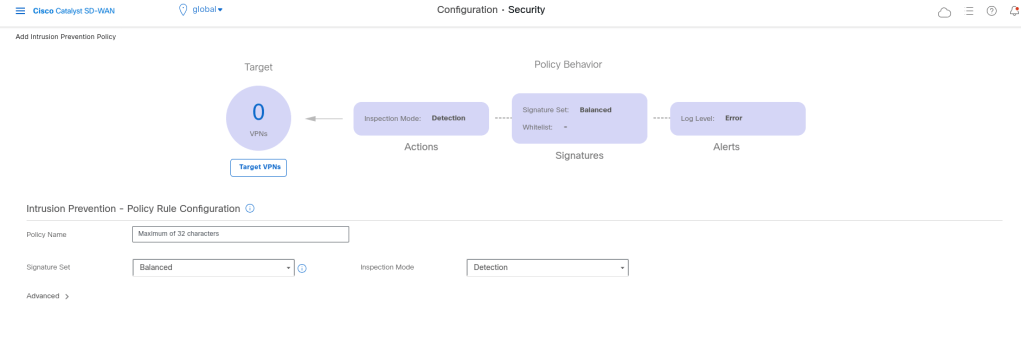
We have 3 layers of security in ips/ids. Every attack has a score. If it is high it is dangerous.
If we want more protection the performance will reduced.
If we select the security it will check more and we will have low performance in compare with the others.
Inspection mode: Can be Detection or protection.
We can also add whit list signature list: if some signature is detected which is matched with this signature it will not detected as attack.
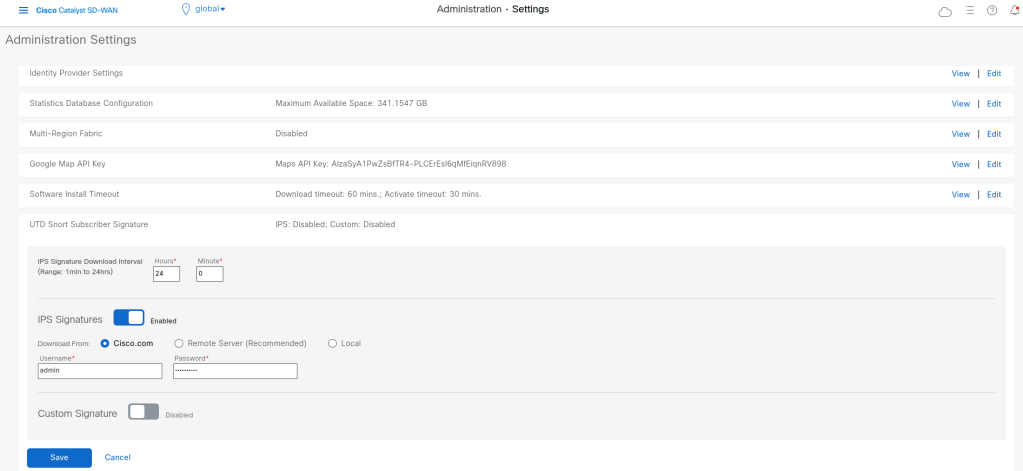
We should add our cisco credentials in vmanage that it can download the security signitures:
URL Filtering
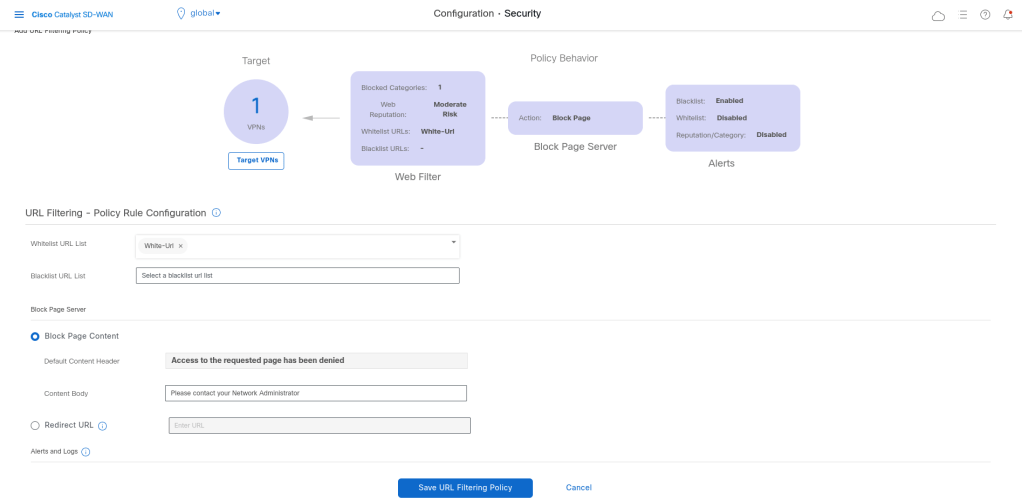
URL Filtering is used to control access to websites and web categories. This allows administrators to define what type of websites users are allowed or denied to access.
Examples:
Block gambling
Block malicious websites
Block phishing categories
Allow only business-related access
In branch environments, users often go directly to the internet.
URL filtering helps reduce risk and enforce acceptable use policies.
AMP (Advanced Malware Protection)
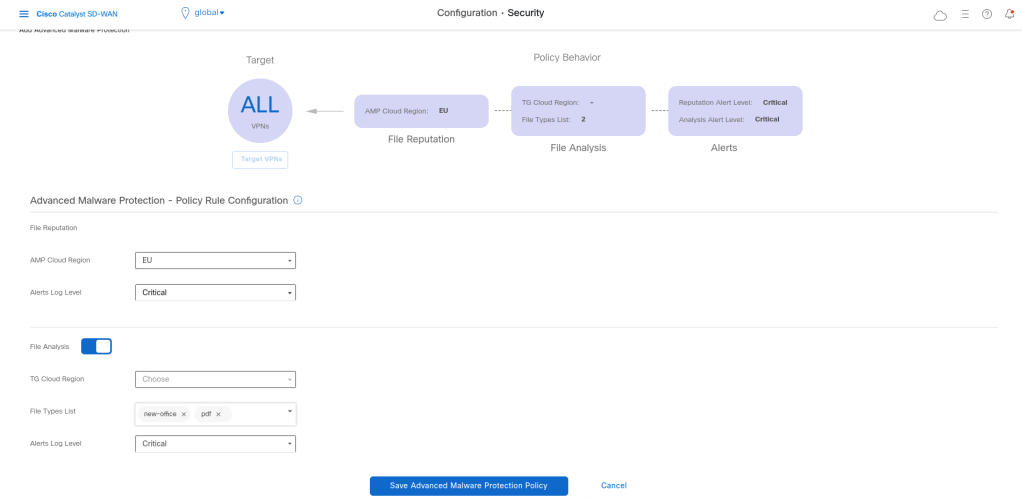
AMP is focused on identifying and blocking malicious files or file-based threats.
It helps detect:
known malware
suspicious files
potentially dangerous downloads
Traditional access control alone is not enough. A user may still download a malicious file from an allowed website. AMP adds another layer of protection by inspecting file behavior and reputation.
For example a branch user downloads a file from the internet. Even if the website itself is allowed, AMP can help identify whether the file is malicious.
DNS Security
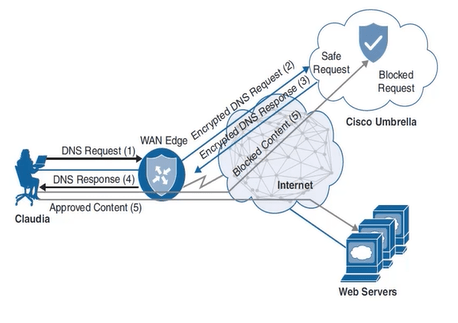
DNS Security is one of the most useful and underrated security layers in modern networks.It is used before most users even reach a website or cloud application.
DNS Security can help block:
malicious domains
command-and-control communication
phishing domains
newly seen suspicious domains
Why it is effective:
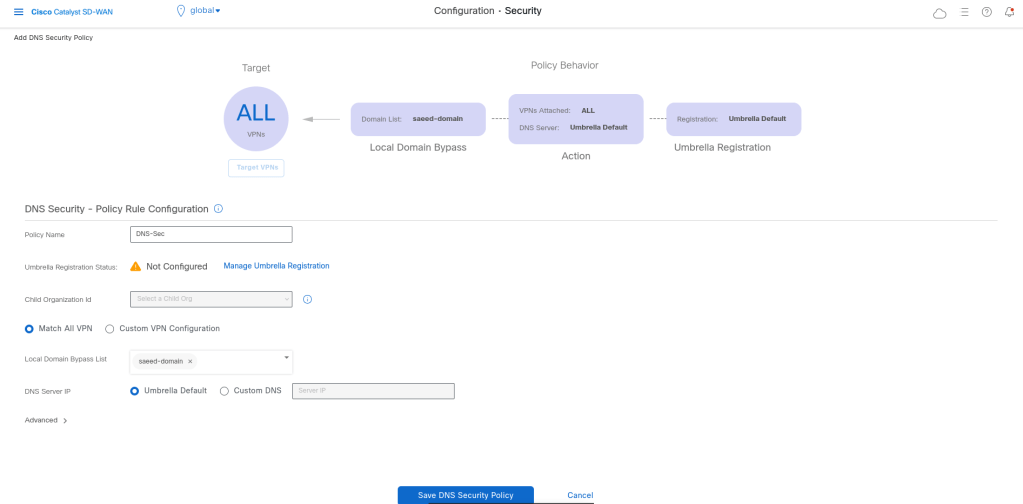
In Cisco environments, This is often associated with security integrations such as Cisco Umbrella. We should have Umbrella token.
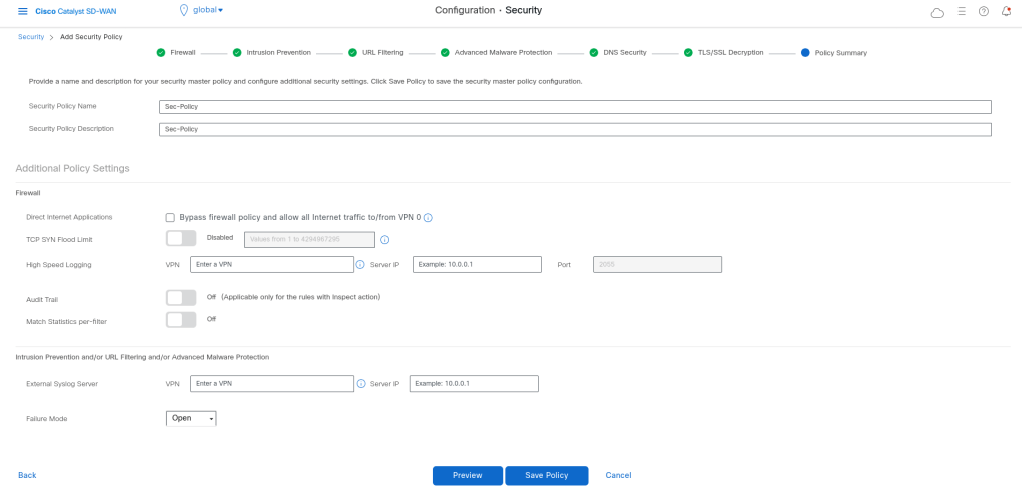
Cisco SD-WAN security policies are built as a layered model, where multiple security functions are applied sequentially to traffic. This allows organizations to combine access control, threat detection, and content filtering into a single unified policy.
Failure Mode = Open
→ Traffic continues if security service fails (availability prioritized) Failure Mode = Close
→ Traffic is blocked if security fails (security prioritized)
policy
 intrusion-prevention IPS
  security-level balanced
  inspection-mode detection
  log-level err
  target-vpns 1
 !
 url-filtering Url-Filtering
  web-category-action block
  web-categories bot-nets
  block-threshold moderate-risk
  white-list White-Url
  block text Access to the requested page has been denied. Please contact your Network Administrator
  alert blacklist
  target-vpns 1
 !
 advanced-malware-protection AMP
  file-reputation-cloud-server cloud-isr-asn.eu.amp.cisco.com
  file-reputation-est-server cloud-isr-est.eu.amp.cisco.com
  file-reputation-alert critical
  target-vpns matchAllVpn
 !
 zone-based-policy FW
    sequence 1
     seq-name Rule_1
     match
      destination-data-prefix-list 8-8-8-8
     !
     action inspect
     !
    !
  default-action drop
 !
  zone Inet
   vpn 0
  !
  zone LAN
   vpn 1
  !
  zone-pair ZP_LAN_Inet_FW
   source-zone LAN
   destination-zone Inet
   zone-policy FW
  !
 lists
  data-prefix-list 8-8-8-8
   ip-prefix 8.8.8.8/32
  !
  url-white-list White-Url
   pattern google.com
   pattern yahoo.com
  !
 !
 zone-to-nozone-internet deny
 failure-mode open
!
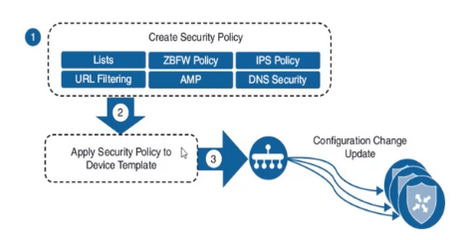
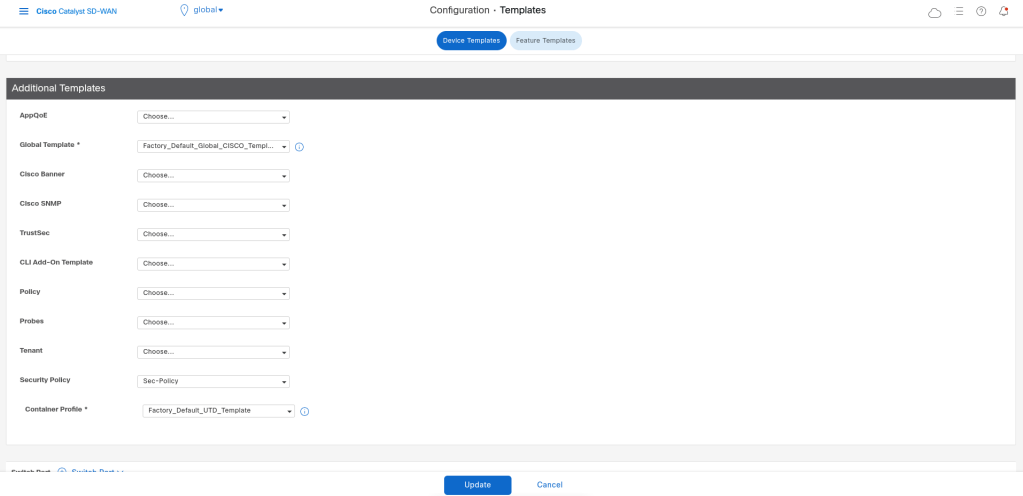
After saving the security policy we can call it in device template, so that will be pushed with netconf to the device. If we use IPS/IDS the device will also download the security container image.

Leave a Reply