Nornir is a Python-based automation framework designed specifically for network engineers who want more control, flexibility, and scalability in their automation workflows. Unlike traditional tools that hide logic behind rigid abstractions, Nornir acts as a lightweight orchestration layer that lets you combine Python code with popular networking libraries such as Netmiko, Scrapli, NAPALM, and pyATS.
At first we should install it: pip install nornir nornir-scrapli
For test Lab we need to configure the routers to accept ssh connection:
en
conf t
hostname R1
ip domain-name networkpuzzles.com
crypto key generate rsa >  2048
ip ssh version 2
line vty 0 4
transport input ssh
login local
exit
#username admin privilege 15 password 0 cisco
We need some files for Nornir. A basic Nornir project looks like this: actually
nornir_project/
├── config.yaml
├── hosts.yaml
├── groups.yaml
├── defaults.yaml
└── main.py
config.yaml: This file tells Nornir where the inventory files are and how to run tasks.
inventory:
  plugin: SimpleInventory
  options:
    host_file: hosts.yaml
    group_file: groups.yaml
    defaults_file: defaults.yaml

#we can use multi-threading:
runner:
  plugin: threaded
  options:
    num_workers: 10


hosts.yaml: This file contains your network devices.
router1:
  hostname: 10.10.10.1
  groups:
    - cisco

router2:
  hostname: 10.10.10.2
  groups:
    - cisco

groups.yaml:Groups help avoid repetition.
cisco:
  platform: ios

defaults.yaml: Defaults apply to all devices unless overridden.
username: admin
password: admin
main.py: Show version
from nornir import InitNornir
from nornir_scrapli.tasks import send_command

nr = InitNornir(config_file="config.yaml")

result = nr.run(
    task=send_command,
    command="show version"
)

for host, task_result in result.items():
    print(f"\n{host}")
    print(task_result.result)
pip install nornir_utils nornir_napalm
Doing a simple test for example show ip int brief:
from nornir import InitNornir

from nornir_utils.plugins.functions import print_result
from nornir_napalm.plugins.tasks import napalm_cli, napalm_configure, napalm_get
from nornir.core.task import Task


nr = InitNornir(
    config_file="config.yaml", dry_run=True
)

def multiple_task(task: Task):

    task.run(
        task=napalm_cli, commands=["show ip int brief"]
    )

results = nr.run(
    task=multiple_task
)

print_result(results)


output:

multiple_task*******************************************************************
* router1 ** changed : False ***************************************************
vvvv multiple_task ** changed : False vvvvvvvvvvvvvvvvvvvvvvvvvvvvvvvvvvvvvvvvvv INFO
---- napalm_cli ** changed : False --------------------------------------------- INFO
{ 'show ip int brief': 'Interface                  IP-Address      OK? Method '
                       'Status                Protocol\n'
                       'GigabitEthernet0/0         192.168.199.30  YES manual '
                       'up                    up      \n'
                       'GigabitEthernet0/1         unassigned      YES unset  '
                       'administratively down down    \n'
                       'GigabitEthernet0/2         unassigned      YES unset  '
                       'administratively down down    \n'
                       'GigabitEthernet0/3         unassigned      YES unset  '
                       'administratively down down'}
^^^^ END multiple_task ^^^^^^^^^^^^^^^^^^^^^^^^^^^^^^^^^^^^^^^^^^^^^^^^^^^^^^^^^
* router2 ** changed : False ***************************************************
vvvv multiple_task ** changed : False vvvvvvvvvvvvvvvvvvvvvvvvvvvvvvvvvvvvvvvvvv INFO
---- napalm_cli ** changed : False --------------------------------------------- INFO
{ 'show ip int brief': 'Interface                  IP-Address      OK? Method '
                       'Status                Protocol\n'
                       'GigabitEthernet0/0         192.168.199.30  YES manual '
                       'up                    up      \n'
                       'GigabitEthernet0/1         unassigned      YES unset  '
                       'administratively down down    \n'
                       'GigabitEthernet0/2         unassigned      YES unset  '
                       'administratively down down    \n'
                       'GigabitEthernet0/3         unassigned      YES unset  '
                       'administratively down down'}
^^^^ END multiple_task ^^^^^^^^^^^^^^^^^^^^^^^^^^^^^^^^^^^^^^^^^^^^^^^^^^^^^^^^^
Nornir NAPALM
NAPALM integrates very well with Nornir and adds a higher level of abstraction for network automation. While Nornir is responsible for orchestration, inventory handling, and running tasks in parallel, NAPALM focuses on interacting with network devices in a safe and vendor-neutral way. With Nornir and NAPALM together, engineers can execute show commands, push configuration changes, take configuration backups, and validate the current device state using a consistent API across different network platforms. This combination helps reduce manual CLI work, lowers the risk of configuration errors, and makes automation workflows easier to scale and maintain.
If we look at the https://github.com/nornir-automation/nornir_napalm/tree/master/nornir_napalm/plugins/tasks we can see the sub modules. In order to use them we should import them in our code, for example for get:
from nornir_napalm.plugins.tasks import napalm_get
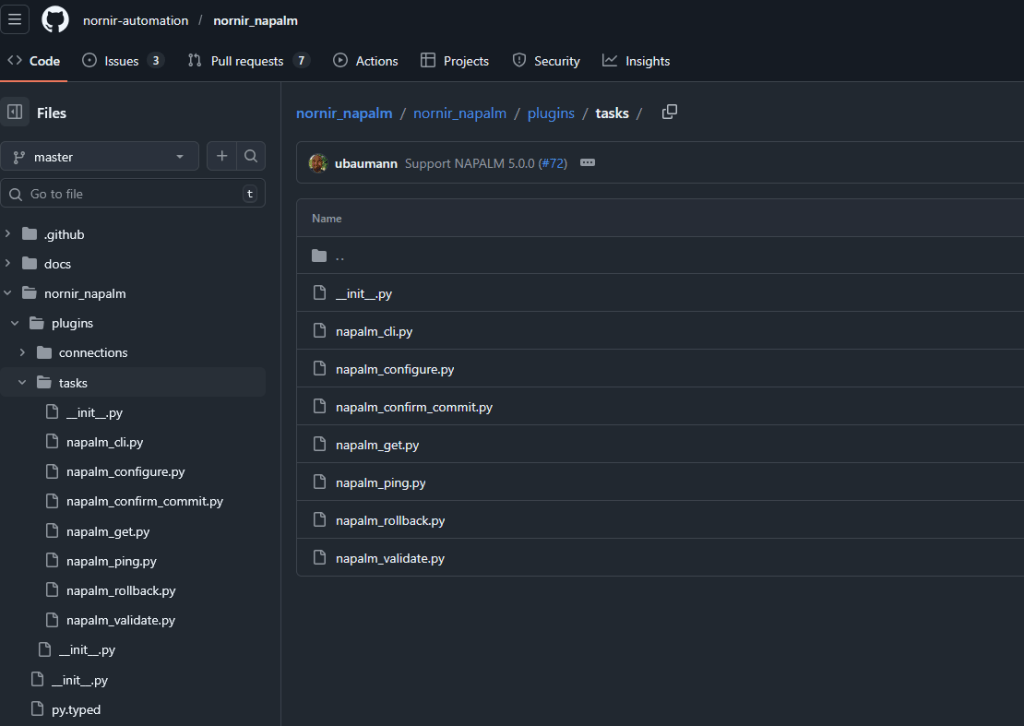
In this example we are going to get the interface info with napalm_get:
from nornir_napalm.plugins.tasks import napalm_get
from nornir_utils.plugins.functions import print_result
from nornir import InitNornir

nr = InitNornir(config_file='config.yaml')


results = nr.run(task=napalm_get, getters=['interfaces'])

print_result(results)


output:
napalm_get**********************************************************************
* router1 ** changed : False ***************************************************
vvvv napalm_get ** changed : False vvvvvvvvvvvvvvvvvvvvvvvvvvvvvvvvvvvvvvvvvvvvv INFO
{ 'interfaces': { 'GigabitEthernet0/0': { 'description': '',
                                          'is_enabled': True,
                                          'is_up': True,
                                          'last_flapped': -1.0,
                                          'mac_address': '50:00:00:01:00:00',
                                          'mtu': 1500,
                                          'speed': 1000.0},
                  'GigabitEthernet0/1': { 'description': '',
                                          'is_enabled': False,
                                          'is_up': False,
                                          'last_flapped': -1.0,
                                          'mac_address': '50:00:00:01:00:01',
                                          'mtu': 1500,
                                          'speed': 1000.0},
                  'GigabitEthernet0/2': { 'description': '',
                                          'is_enabled': False,
                                          'is_up': False,
                                          'last_flapped': -1.0,
                                          'mac_address': '50:00:00:01:00:02',
                                          'mtu': 1500,
                                          'speed': 1000.0},
                  'GigabitEthernet0/3': { 'description': '',
                                          'is_enabled': False,
                                          'is_up': False,
                                          'last_flapped': -1.0,
                                          'mac_address': '50:00:00:01:00:03',
                                          'mtu': 1500,
                                          'speed': 1000.0}}}
^^^^ END napalm_get ^^^^^^^^^^^^^^^^^^^^^^^^^^^^^^^^^^^^^^^^^^^^^^^^^^^^^^^^^^^^
* router2 ** changed : False ***************************************************
vvvv napalm_get ** changed : False vvvvvvvvvvvvvvvvvvvvvvvvvvvvvvvvvvvvvvvvvvvvv INFO
{ 'interfaces': { 'GigabitEthernet0/0': { 'description': '',
                                          'is_enabled': True,
                                          'is_up': True,
                                          'last_flapped': -1.0,
                                          'mac_address': '50:00:00:01:00:00',
                                          'mtu': 1500,
                                          'speed': 1000.0},
                  'GigabitEthernet0/1': { 'description': '',
                                          'is_enabled': False,
                                          'is_up': False,
                                          'last_flapped': -1.0,
                                          'mac_address': '50:00:00:01:00:01',
                                          'mtu': 1500,
                                          'speed': 1000.0},
                  'GigabitEthernet0/2': { 'description': '',
                                          'is_enabled': False,
                                          'is_up': False,
                                          'last_flapped': -1.0,
                                          'mac_address': '50:00:00:01:00:02',
                                          'mtu': 1500,
                                          'speed': 1000.0},
                  'GigabitEthernet0/3': { 'description': '',
                                          'is_enabled': False,
                                          'is_up': False,
                                          'last_flapped': -1.0,
                                          'mac_address': '50:00:00:01:00:03',
                                          'mtu': 1500,
                                          'speed': 1000.0}}}
napalm_configure on Cisco IOS needs SCP (and often enable/privilege), not just SSH.
conf t
ip scp server enable
end
wr mem
In order to send the configuration:
from nornir import InitNornir
from nornir_utils.plugins.functions import print_result
from nornir_napalm.plugins.tasks import napalm_configure


nr = InitNornir(config_file='config.yaml')


results = nr.run(task=napalm_configure, configuration='interface loo100')


print_result(results)


output:
napalm_configure****************************************************************
* router1 ** changed : True ****************************************************
vvvv napalm_configure ** changed : True vvvvvvvvvvvvvvvvvvvvvvvvvvvvvvvvvvvvvvvv INFO
+interface loo100
^^^^ END napalm_configure ^^^^^^^^^^^^^^^^^^^^^^^^^^^^^^^^^^^^^^^^^^^^^^^^^^^^^^
* router2 ** changed : True ****************************************************
vvvv napalm_configure ** changed : True vvvvvvvvvvvvvvvvvvvvvvvvvvvvvvvvvvvvvvvv INFO
+interface loo100
^^^^ END napalm_configure ^^^^^^^^^^^^^^^^^^^^^^^^^^^^^^^^^^^^^^^^^^^^^^^^^^^^^^
* router3 ** changed : True ****************************************************
vvvv napalm_configure ** changed : True vvvvvvvvvvvvvvvvvvvvvvvvvvvvvvvvvvvvvvvv INFO
+interface loo100
^^^^ END napalm_configure ^^^^^^^^^^^^^^^^^^^^^^^^^^^^^^^^^^^^^^^^^^^^^^^^^^^^^^
* router4 ** changed : True ****************************************************
vvvv napalm_configure ** changed : True vvvvvvvvvvvvvvvvvvvvvvvvvvvvvvvvvvvvvvvv INFO
+interface loo100
We can also send the configs with a config file:
def napalm_configure(
    task: Task,
    dry_run: Optional[bool] = None,
    filename: Optional[str] = None,
    configuration: Optional[str] = None,
    replace: bool = False,
    commit_message: Optional[str] = None,
    revert_in: Optional[int] = None,
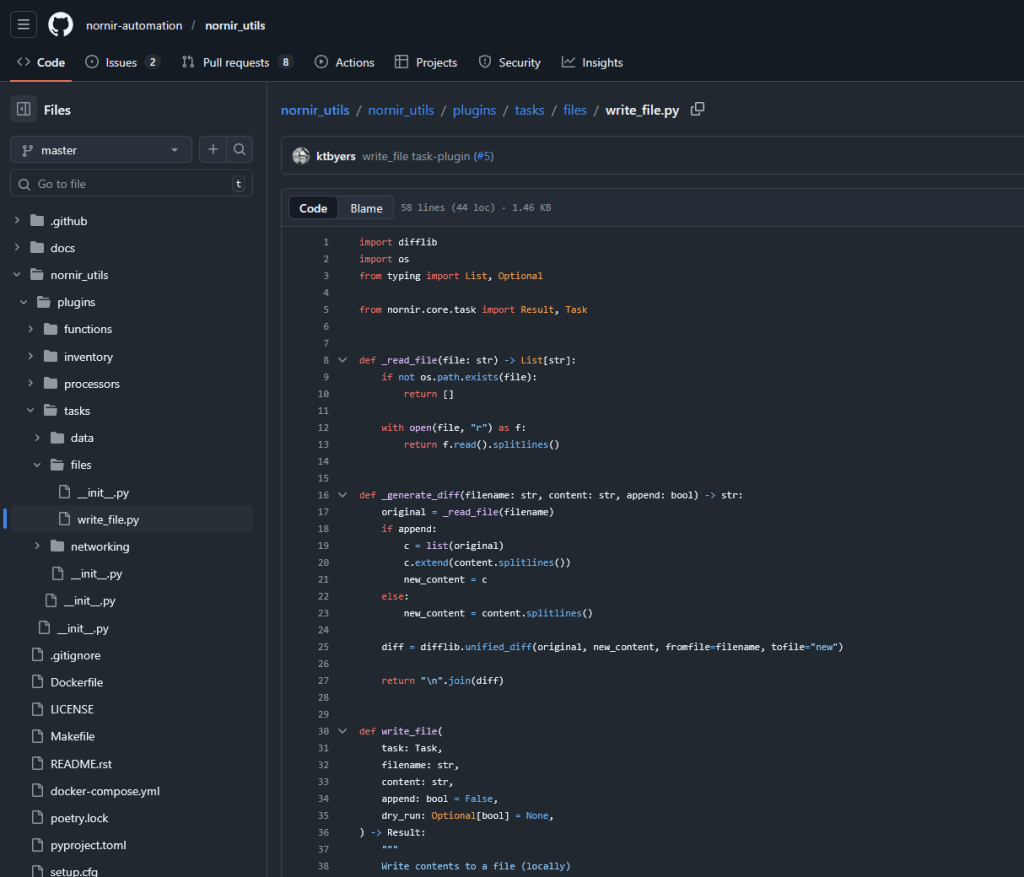
Now we know how to read the data from the router, how we can write them into a file? we can use context manager but there is a function for that in nornir library:
from nornir import InitNornir
from nornir_napalm.plugins.tasks import napalm_get
from nornir_utils.plugins.functions import print_result
from nornir_utils.plugins.tasks.files import write_file

from nornir import InitNornir

nr = InitNornir(config_file='config.yaml')


def backup(task):
    get_config = task.run(task=napalm_get, getters=['config'])
    get_running = get_config.result['config']['running']
    task.run(task=write_file, content=get_running, filename='running.txt')

result = nr.run(task=backup)
To replace the config, at first we should enable the archive on the router:
archive
path flash:archive
write-memory
from nornir import InitNornir
from nornir_napalm.plugins.tasks import napalm_configure
from nornir_utils.plugins.functions import print_result


nr = InitNornir(config_file='config.yaml', dry_run=False)


results = nr.run(task=napalm_configure, filename='running.txt', replace=True)

print_result(results)
Nornir Scarpli
NAPALM and Scrapli solve different but complementary problems in network automation. NAPALM provides a high-level, vendor-neutral abstraction that focuses on intent, consistency, and safety. It is ideal for tasks like configuration backups, state validation, and controlled configuration changes with rollback support. Scrapli, on the other hand, operates at a lower level and focuses on direct device communication. It offers full control over CLI interactions, high performance, and asynchronous execution, making it well suited for large-scale data collection, legacy devices, or environments with inconsistent SSH behavior.
To install nornir scapli:
pip install nornir_scrapli
If we want to send the commands to the router(s):
from nornir import InitNornir
from nornir_utils.plugins.functions import print_result
from nornir_scrapli.tasks import send_config, send_configs, send_configs_from_file

nr = InitNornir(config_file="config.yaml")

configs = ['router os 1', [router-id 1.1.1.1]]

# Codeium: Refactor | Explain | Generate Docstring
def cfg_sender(task):
    result = task.run(task=send_config, config=configs)

result = nr.run(task=cfg_sender)
print_result(result)


# we can also use config file:
# Codeium: Refactor | Explain | Generate Docstring
def cfg_sender(task):
    result = task.run(task=send_config_from_file, config='config.txt')
If we want to use Jinja2 template at first install it with pip install nornir_jinja2 then we need to import template_file :
from nornir_jinja2.plugins.tasks import template_file
About the data we should have yaml file which contains the data and we should edit the config.yaml file in order to point the data yaml file for host file. So that means the data should be in host file to be able to rendered.
dry_run=True means show me what would change, but do not actually change anything on the devices. Actually dry_run lets you verify your automation before touching production and keep in mind It only prevents execution.
from nornir import InitNornir
from nornir_scrapli.tasks import send_configs
from nornir_utils.plugins.functions import print_result
from nornir_jinja2.plugins.tasks import template_file

nr = InitNornir(config_file="config.yaml", dry_run=True)

# Codeium: Refactor | Explain | Generate Docstring
def run_template(task):
    template = task.run(
        task=template_file,
        template="interface.j2",
        path=""
    ).result

    task.run(task=send_configs, configs=template.splitlines())

results = nr.run(task=run_template)
print_result(results)

Leave a comment