For cisco Switches there is another API framework called NX-API which we can manage them with.
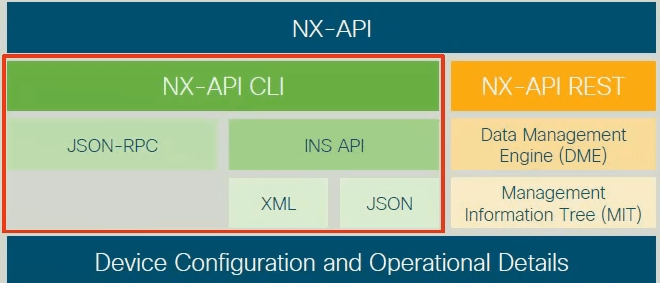
I am using a test device in cisco sandbox. at first we need to enable the nx-api feature on the device. Unlike postman, here we have only one URL which is /ins and also we use only POST.
If I choose cli method and writ the cisco cli command It will make the request json rpc code and I also can send them to the device and see what is the result. As an example I used show interface status here:
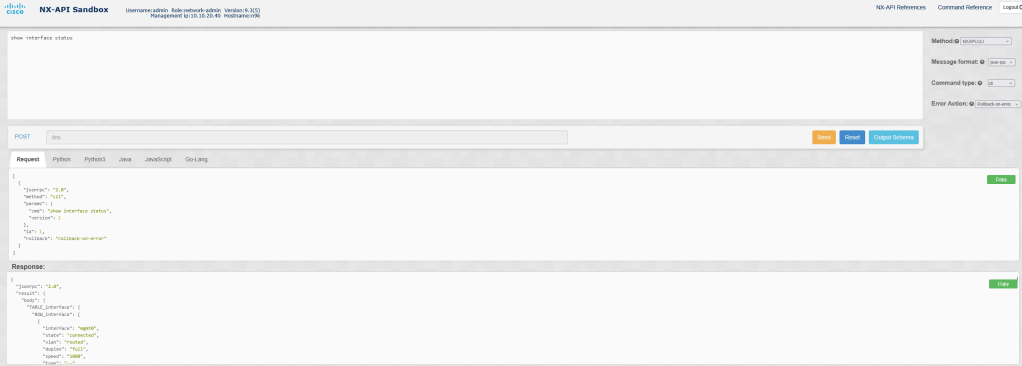
like postman we can have the python code for action:
import requests
import json

"""
Modify these please
"""
#For NXAPI to authenticate the client using client certificate, set 'client_cert_auth' to True.
#For basic authentication using username & pwd, set 'client_cert_auth' to False.
client_cert_auth=False
switchuser='USERID'
switchpassword='PASSWORD'
client_cert='PATH_TO_CLIENT_CERT_FILE'
client_private_key='PATH_TO_CLIENT_PRIVATE_KEY_FILE'
ca_cert='PATH_TO_CA_CERT_THAT_SIGNED_NXAPI_SERVER_CERT'

url='http://10.10.20.40/ins'
myheaders={'content-type':'application/json-rpc'}
payload=[
  {
    "jsonrpc": "2.0",
    "method": "cli",
    "params": {
      "cmd": "show interface status",
      "version": 1
    },
    "id": 1,
    "rollback": "rollback-on-error"
  }
]

if client_cert_auth is False:
    response = requests.post(url,data=json.dumps(payload), headers=myheaders,auth=(switchuser,switchpassword)).json()
else:
    url='https://10.10.20.40/ins'
    response = requests.post(url,data=json.dumps(payload), headers=myheaders,auth=(switchuser,switchpassword),cert=(client_cert,client_private_key),verify=ca_cert).json()
we can also use different data formating like xml. As you know cisco nexux switches have linux bash which we can use ns-api sandbox to sent command to it.
we can use the sanbox to have the jason, xml format of our requests and use them in postman.

Leave a comment